
Starting an online business is exciting, but figuring out how to sell on Shopify, find customers, manage products, and generate consistent sales can quickly become overwhelming. Many beginners build attractive stores, upload products, and wait for orders that never arrive. The problem isn’t necessarily the product or platform. It’s often the lack of a clear selling strategy.
Shopify makes it easier to create an online store without advanced technical knowledge, but building a successful e-commerce business requires more than choosing a theme and adding a payment button. You need the right products, compelling product pages, reliable payment methods, a smooth checkout experience, and a marketing strategy that reaches people who are ready to buy.
Whether you’re launching your first business, expanding an existing brand, or exploring dropshipping, understanding how to sell on Shopify can help you turn an idea into a functioning online business.
This guide explains everything from setting up your store and choosing products to processing orders, attracting customers, and improving conversions. You’ll also learn about common mistakes, selling costs, and practical strategies for growing beyond your first sale.
Quick Summary: How to Sell on Shopify
To sell on Shopify, create an account, choose a store name, select a suitable plan, add products, customize your storefront, configure payments and shipping, and connect a domain. Publish your store, promote your products through SEO and social media, and manage incoming orders through Shopify’s dashboard. Monitor performance and continuously optimize your product pages, marketing, and checkout experience.
If you’re new to the platform, start by understanding what Shopify is and how it works before setting up your online store.
Understand What You Need Before Selling on Shopify
Before creating your Shopify store, identify what you want to sell, who your customers are, and how you plan to make a profit. Proper planning helps you avoid unnecessary expenses and build your business around genuine market demand.
Choose Your Products or Niche
Explore things to sell on Shopify, including clothing, accessories, digital products, and home essentials. These are common examples of what do people sell on Shopify
Popular categories include:
- Clothing and fashion accessories
- Beauty and skincare products
- Home and kitchen accessories
- Fitness equipment
- Electronics accessories
- Pet supplies
- Digital products and eBooks
These options also make it possible to learn how to sell on Shopify without inventory by using dropshipping suppliers, print-on-demand services, or digital product downloads.
Rather than following trends blindly, consider product demand, competition, and profit potential before making a decision.
Research Your Target Audience
Understanding your potential customers helps you choose products that match their needs and purchasing preferences.
Consider these questions:
- Who is most likely to buy your products?
- What price range can they afford?
- What problems do existing products fail to solve?
- Which competitors are targeting the same audience?
Use Google Trends, competitor websites, social media, and customer reviews to identify market opportunities and understand customer expectations.
Validate Product Demand and Competition
Before investing in inventory, research whether customers are actively searching for your chosen products.
Analyze competitor pricing, product quality, customer feedback, and marketing strategies. Look for opportunities to offer better quality, competitive pricing, or a more convenient shopping experience.
A product with proven demand and manageable competition is generally a stronger starting point than one selected simply because it’s trending.
Calculate Your Potential Profit
Calculate your expenses before setting product prices. Consider product costs, packaging, shipping, payment processing, Shopify subscription fees, and marketing expenses.
For example, if you purchase a product for $15 and sell it for $35, your initial margin is $20 before additional expenses.
Subtract your operating costs to understand your actual contribution per sale and determine whether the product offers sustainable profit potential.
Once these basics are clear, you can move forward with setting up your Shopify store.
How to Sell on Shopify: Set Up Your Online Store
Once you’ve selected your business model, it’s time to create your Shopify store.
The setup process is straightforward, but each decision affects how customers experience your business.
Step 1: Create a Shopify account
Visit Shopify’s official website and create an account.
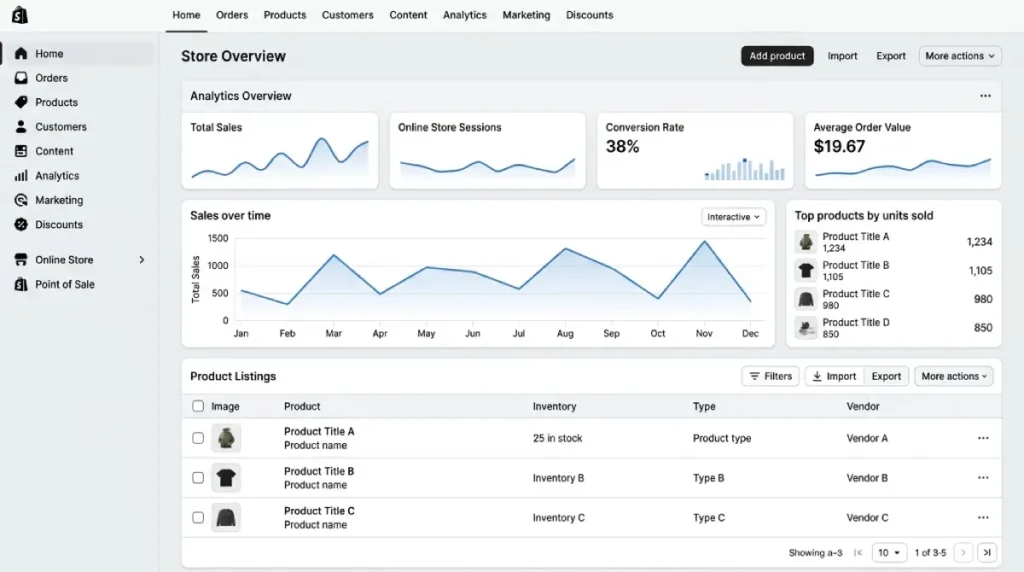
You’ll provide basic information about your business and follow the onboarding instructions. Shopify then gives you access to your administration dashboard, where you can manage products, orders, customers, and store settings.
You don’t need programming experience to get started.
Step 2: Choose a store name and domain
Your store name should be:
- Easy to remember and pronounce.
- Relevant to your products or brand identity.
- Distinctive enough to stand out.
- Suitable for future business expansion.
Shopify provides a default myshopify.com address. However, purchasing a custom domain generally creates a more professional impression and makes your business easier to recognize.
For example, a brand selling organic skincare products might choose a memorable domain that reflects its brand identity rather than using a generic store address.
Check domain availability and relevant trademark restrictions before committing to a name.
Step 3: Select a Shopify Plan
Your subscription should match your business requirements rather than your ambitions alone.
| Plan | Best suited for | Key consideration |
|---|---|---|
| Basic | New entrepreneurs and solo sellers | Core ecommerce functionality |
| Grow | Established small businesses | Additional staff and lower eligible payment rates |
| Advanced | Growing international businesses | Advanced reporting and shipping features |
| Plus | High-volume and complex operations | Enterprise-level commerce capabilities |
Shopify’s displayed pricing varies according to billing frequency, location, currency, and promotions. Review the official Shopify pricing page before choosing a plan.
A beginner usually doesn’t need an expensive subscription. Start with the features you actually need and upgrade when business growth justifies the additional expense.
Step 4: Choose and customize your theme
Your website design should make shopping easy.
Choose a responsive theme that works smoothly on smartphones, tablets, and desktop computers. Most online shoppers browse products on mobile devices, so mobile usability deserves particular attention.
Focus on these elements:
- A clear logo and consistent brand colors.
- Simple navigation and organized product categories.
- High-quality product photography.
- Readable fonts and clear headings.
- Visible shopping cart and checkout options.
- Prominent calls to action.
Avoid unnecessary animations, excessive pop-ups, and too many apps. A visually impressive website is useful only when customers can navigate it comfortably.
Step 5: Create essential store pages
A trustworthy Shopify store should include more than product listings.
Create the following pages:
- About Us: Explain your brand, mission, and what makes your business different.
- Contact Us: Provide a working contact method and realistic support expectations.
- Shipping Policy: Explain delivery methods, processing times, and shipping charges.
- Refund and Return Policy: Clearly communicate eligibility and return procedures.
- Privacy Policy: Explain how customer information is collected and handled.
- Terms of Service: Outline the conditions governing purchases and website usage.
Make sure your policies reflect the laws applicable to your business and customers.
Add Products That Encourage Customers to Buy
Adding products is one of the most important steps when learning how to sell on Shopify. Your product pages must answer customer questions, communicate value, and reduce uncertainty.
How to add products to Shopify
Follow these steps:
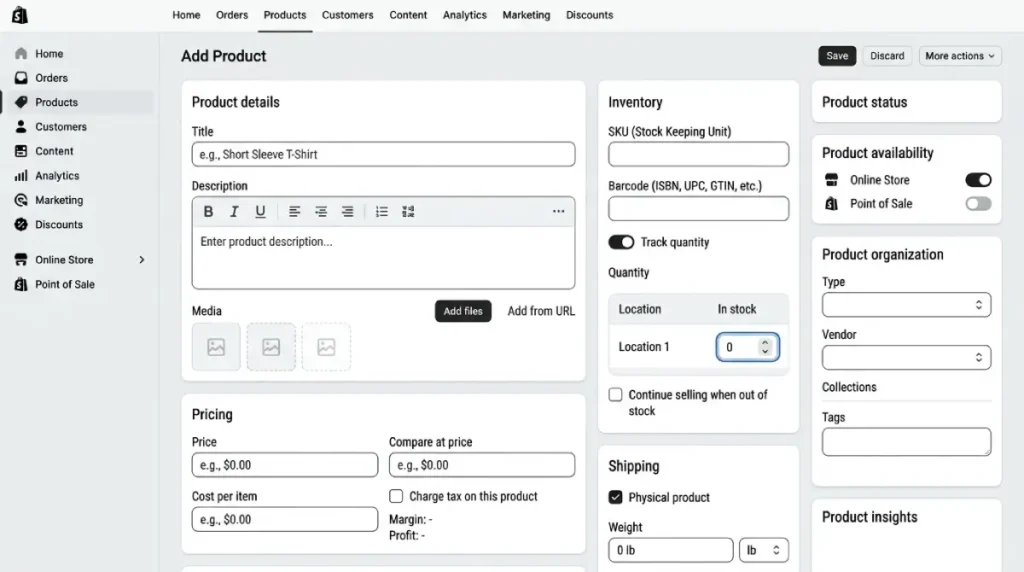
- Open your Shopify administration dashboard.
- Navigate to Products.
- Select Add product.
- Enter your product title and description.
- Upload high-quality product images or videos.
- Set your selling price and available inventory.
- Add product variants such as size, color, or material.
- Configure shipping details if the product requires delivery.
- Organize the product into relevant collections.
- Save and preview your listing.
Shopify also supports product organization through collections, making it easier for visitors to discover related items.
Write product descriptions that sell
A product description shouldn’t simply list specifications. It should explain why someone would benefit from purchasing the product.
Consider two approaches:
Weak description:
“Premium cotton T-shirt. Available in multiple colors and sizes.”
Stronger description:
“Enjoy everyday comfort with a soft cotton T-shirt designed for casual wear. Its versatile fit makes it easy to pair with jeans, shorts, or your favorite everyday outfits.”
The second description communicates practical value and helps customers imagine using the product.
Include:
- Primary product benefits.
- Important features and specifications.
- Materials, dimensions, and sizing information.
- Care instructions when relevant.
- Delivery and warranty information where applicable.
- Answers to common purchasing questions.
Use product images Strategically
Customers cannot physically inspect your products online. Your images must compensate for that limitation.
Use:
- Clear front, back, and side photographs.
- Close-up images showing materials and details.
- Lifestyle images demonstrating real-world use.
- Product videos when they clarify functionality.
- Accurate images of different colors and variations.
Never use misleading images that create expectations your actual product cannot meet.
Price products for Profitability
A common beginner mistake is pricing products based only on competitors.
Instead, calculate your actual costs.
For example:
| Expense | Example cost |
|---|---|
| Product purchase | $12 |
| Packaging | $2 |
| Shipping subsidy | $4 |
| Payment processing | $1.50 |
| Marketing allocation | $5 |
| Total estimated cost | $24.50 |
| Selling price | $39.00 |
| Contribution before other overhead | $14.50 |
This example produces a contribution of $14.50 per sale before subscription costs, taxes, refunds, and other overhead.
The lesson is simple: revenue isn’t profit.
Build your pricing strategy around sustainable margins rather than chasing the lowest price in your market.
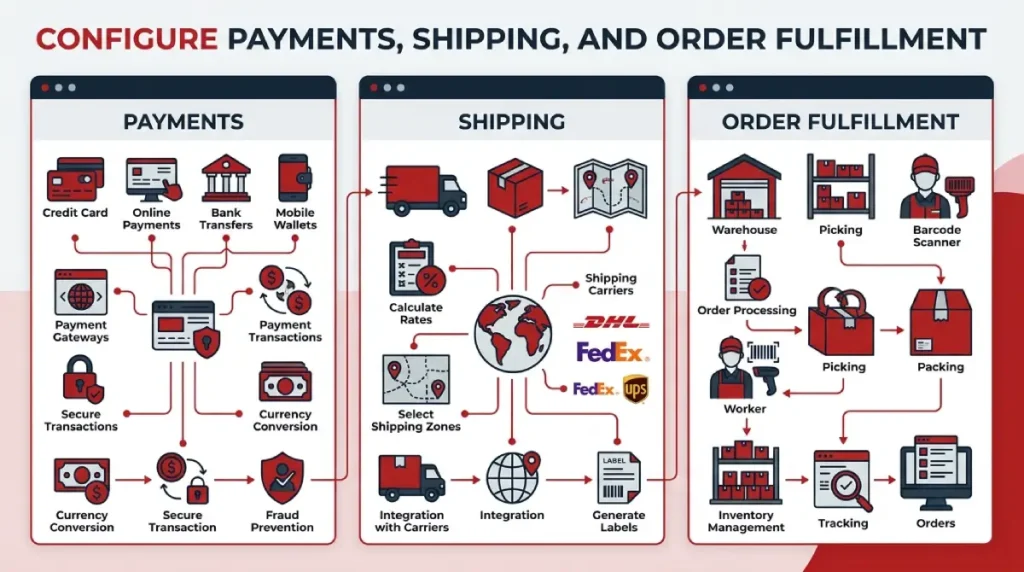
Configure Payments, Shipping, and Order Fulfillment
A customer might love your product and still abandon the purchase if checkout is confusing or payment options are unsuitable.
This is why payment and fulfillment configuration should be completed before launching your Shopify store.
Set up payment methods
Go to your Shopify dashboard and open Settings > Payments.
Review the payment providers available for your business location and activate an appropriate option.
Depending on your country and eligibility, payment methods may include:
- Credit and debit cards.
- Shopify Payments.
- PayPal.
- Digital wallets.
- Supported regional payment providers.
- Manual payment methods, where appropriate.
Important for global sellers: Shopify Payments isn’t available in every country. If your business is based in an unsupported region, you’ll need to investigate compatible third-party providers. Availability, business verification, payout requirements, and supported currencies vary.
For example, an entrepreneur operating from Pakistan should verify available payment gateways and payout arrangements before investing heavily in store development.
Never assume that a payment provider available to a US-based merchant will also be available to your business.
Configure shipping options
Your shipping strategy depends on your products, suppliers, and target markets.
Common approaches include:
| Shipping method | How it works | Suitable for |
|---|---|---|
| Flat-rate shipping | One fixed delivery charge | Small product catalogs |
| Free shipping | Shipping cost included in pricing | Promotional campaigns |
| Weight-based shipping | Cost calculated using package weight | Physical products |
| Carrier-calculated shipping | Rates based on shipping provider data | Variable shipping destinations |
| Local pickup | Customers collect their purchases | Local businesses |
If you’re selling internationally, clearly explain delivery estimates, customs duties, import taxes, and potential delays.
Don’t promise unrealistic delivery times simply to compete with larger retailers.
Test the checkout process
Before accepting real orders, place test orders using the payment testing options available to your store.
Check that:
- Product prices are correct.
- Shipping charges calculate correctly.
- Discount codes work as expected.
- Customers receive order confirmation emails.
- Inventory updates appropriately.
- The checkout works on mobile devices.
A successful test order can reveal problems that might otherwise cost you actual sales.
Launch Your Shopify Store and Start Getting Customers
Understanding how to sell on Shopify is only half the process. The next challenge is getting potential customers to discover your store and trust your products.
Even an excellent store won’t generate consistent sales without traffic.
Search engine optimization (SEO)
SEO helps your Shopify store appear in search engine results when potential customers look for products you sell.
Start with these activities:
- Research keywords: Identify phrases customers use when searching for your products.
- Optimize product titles: Include relevant search terms without making titles sound unnatural.
- Write unique descriptions: Avoid copying supplier descriptions or competitors’ content.
- Optimize images: Use descriptive file names and appropriate alternative text.
- Improve website structure: Organize products into logical collections and categories.
- Publish useful blog content: Answer questions related to your products and industry.
- Improve page performance: Maintain a responsive, fast-loading website.
For example, a store selling handmade leather wallets could target searches such as “genuine leather wallets for men” or “minimalist leather card holders.”
The goal is to attract qualified visitors rather than simply increasing website traffic.
[Internal Link Anchor Text: Shopify SEO Guide: How to Rank Your Store on Google]
Social media marketing
Platforms such as Instagram, TikTok, Facebook, and Pinterest can help you introduce your products to new audiences.
Create content that demonstrates your products rather than constantly asking people to purchase.
Effective content ideas include:
- Product demonstrations.
- Before-and-after comparisons.
- Customer testimonials.
- Behind-the-scenes videos.
- Packaging and order preparation.
- Frequently asked product questions.
For instance, a skincare brand could publish short videos demonstrating how to use a product and explaining its ingredients.
Always disclose paid partnerships and avoid unsupported product claims.
To increase brand awareness and attract potential customers, explore effective social media marketing strategies for promoting your Shopify products.
Paid advertising
Paid advertising can generate traffic more quickly than organic SEO, but it requires careful budgeting.
Consider these channels:
| Advertising channel | Main advantage | Best use |
|---|---|---|
| Google Ads | Captures active search demand | High-intent product searches |
| Meta Ads | Audience targeting and visual formats | Product discovery and retargeting |
| TikTok Ads | Short-form video exposure | Demonstrable and trend-friendly products |
| Pinterest Ads | Visual product discovery | Home décor, fashion, and lifestyle |
Start with a manageable testing budget. Measure conversions and customer acquisition costs before increasing spending.
Email marketing
Email marketing helps you build relationships with customers beyond their initial purchases.
Collect email addresses with appropriate consent and create campaigns for:
- Welcome messages.
- New product announcements.
- Abandoned checkout reminders.
- Special promotions.
- Post-purchase follow-ups.
- Repeat customer offers.
A customer who purchases once might become a valuable repeat buyer when you provide relevant recommendations and a positive post-purchase experience.
Manage Orders, Track Performance, and Grow Your Business
Getting your first order is an important milestone, but building a profitable business requires consistent operational management.
Manage orders efficiently
Shopify provides an administration dashboard where you can monitor incoming orders, update fulfillment status, and access customer information.
A basic fulfillment workflow looks like this:
- Receive a customer order.
- Verify the payment and order details.
- Check product availability.
- Prepare the product for shipment or digital delivery.
- Arrange shipping and provide tracking information.
- Update the order status.
- Follow up when appropriate.
For dropshipping businesses, coordinate with suppliers to ensure that orders are processed accurately and dispatched within the promised timeframe.
Monitor important ecommerce metrics
Don’t judge your store’s success by revenue alone.
Track these performance indicators:
| Metric | What it tells you |
|---|---|
| Website traffic | Number of visitors |
| Conversion rate | Percentage of visitors who purchase |
| Average order value | Average amount spent per order |
| Customer acquisition cost | Cost of acquiring a customer |
| Cart abandonment rate | How often customers leave before purchasing |
| Repeat purchase rate | How frequently customers return |
| Gross profit margin | Profit remaining after product costs |
For example, if 1,000 people visit your store and 20 complete purchases, your conversion rate is 2%.
If traffic increases but sales remain unchanged, investigate product relevance, pricing, trust signals, and checkout usability before spending more on advertising.
Avoid common Shopify selling mistakes
Many new sellers make preventable mistakes that limit growth.
Watch out for these problems:
- Launching without testing payment methods.
- Choosing products without researching demand.
- Copying competitors’ product descriptions.
- Using low-quality product photographs.
- Ignoring mobile shopping experiences.
- Spending heavily on advertising before validating conversions.
- Offering unrealistic shipping promises.
- Installing too many unnecessary apps.
- Ignoring customer complaints and refund requests.
The most effective approach is to launch with a focused product range, understand customer behavior, and improve the store using real performance data.
Frequently Asked Questions
1. How much does Shopify take from a $100 sale?
Shopify’s charges depend on your subscription plan, payment provider, and transaction method. With Shopify Payments, eligible merchants pay applicable card processing fees. Third-party payment providers may also involve additional transaction fees.
2. Which is better, Etsy or Shopify?
Etsy is suitable for sellers who want access to an existing marketplace, particularly for handmade, vintage, and craft products. Shopify is better for businesses that want their own branded online store, greater customization, and control over their customer experience.
3. Does Shopify take 5,000?
Shopify does not charge a fixed amount of 5,000 from every seller. Its subscription fees depend on the selected plan, billing frequency, and country. Additional costs may include payment processing, third-party transaction fees, domain registration, and optional apps. Check Shopify’s official pricing page for the latest charges.
4. How much does it really cost to sell on Shopify?
The total cost includes your Shopify subscription, domain, payment processing, product inventory, shipping, marketing, and optional apps. Your actual investment depends on your business model, product selection, and operational requirements.
5. How do I sell on Shopify for beginners?
Beginners can start by creating a Shopify account, selecting products, customizing their storefront, and configuring payment and shipping options. Before launching, test the checkout process and prepare essential store policies.
6. Can I sell on Shopify without inventory?
Yes. You can sell through dropshipping, print-on-demand services, and digital products without maintaining physical inventory. However, you’re still responsible for product quality, customer service, and order fulfillment.
7. Can I sell internationally using Shopify?
Yes. Shopify supports international selling through features such as Shopify Markets, localized storefronts, and supported payment methods. Payment availability, shipping options, taxes, and customs requirements depend on your business location and target markets.
Conclusion: Start Selling on Shopify With a Strategy That Can Grow
Learning how to sell on Shopify is an important first step toward building an online business, but long-term success comes from making informed decisions at every stage.
Choose products that solve real customer problems, create a professional storefront, write persuasive product descriptions, and configure reliable payment and shipping options. Once your store is ready, invest in SEO, social media, email marketing, and carefully measured advertising to attract potential buyers.
Remember that a profitable Shopify business isn’t built overnight. Your first product listing, first website visitor, and first order are opportunities to learn what works. Monitor your performance, listen to customer feedback, and improve your store as your business develops.
You don’t need hundreds of products or an expensive website to get started. You need a clear business model, a product worth selling, and a practical plan for reaching the right audience.
Ready to turn your business idea into an online store? Visit Shopify today, explore its store-building features, and take the first step toward launching your ecommerce business. Start small, test your strategy, and build a store designed for sustainable growth.