
Most people who want to sell on the Noon marketplace lose weeks at the very first hurdle: they register, upload the wrong paperwork, and get flagged as ineligible. It’s frustrating, especially when you’ve already found a product and a supplier.
The usual advice makes it worse. Generic “how to sell online” guides skip the country-specific rules for the UAE, Saudi Arabia, and Egypt, and they gloss over the fees that decide whether you make money or just generate revenue.
This guide covers the whole path. You’ll see what you need before registering, how to complete the eight registration steps, how Seller Lab works, how to list products, how to choose between FBN and FBP, what the costs look like, and how to get your first sale. It also covers the mistakes that slow new sellers down.
Quick Answer: How to Sell on Noon Marketplace?
To sell on the Noon marketplace, register a seller account in Noon Seller Lab for the UAE, Saudi Arabia, or Egypt. Upload a valid trade license, tax details, and identity proof, then list products and choose Fulfilled by Noon (FBN) or Fulfilled by Partner (FBP). Orders ship after your account and listings are approved.
What Do You Need to Start Selling on Noon Marketplace?
Preparation decides how fast you get approved. Gather everything before you open the registration form.
Business Registration Requirements
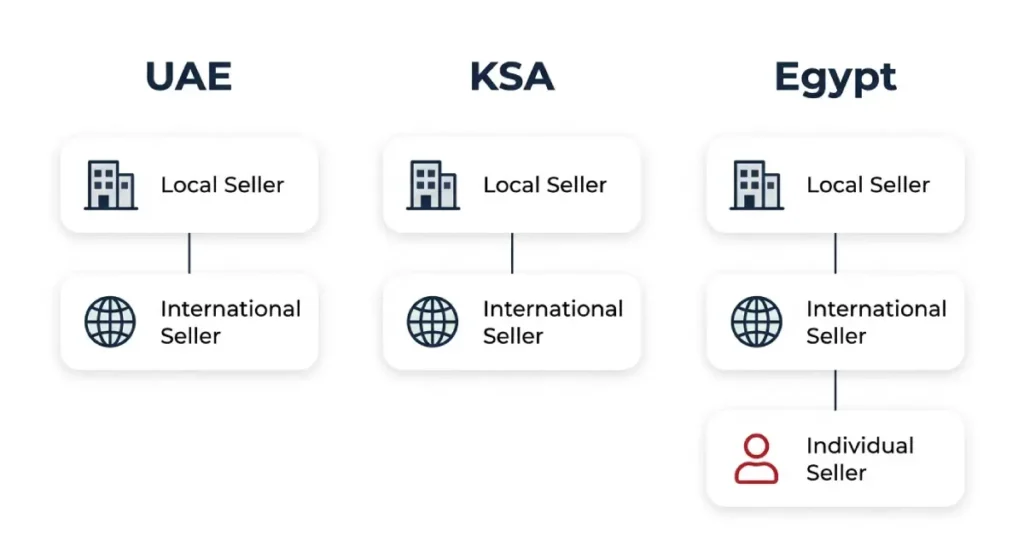
Noon has three seller categories:
| Seller type | Who it’s for |
|---|---|
| Local seller | Business registered in the country where you sell (UAE, KSA, or Egypt) |
| International seller | Business registered outside the selling country |
| Individual seller | Egypt only, using a Data Certificate |
Your license must be valid and include at least one of these activities: sales, trading, manufacturing, or distribution/wholesale. Service-only licenses are not accepted, and this is a leading cause of ineligibility.
Documents Required to Become a Noon Seller
The core set is:
- A trade license or commercial registration with at least 30 days of validity left
- Tax registration details for the country you sell in
- Valid ID of the person named on the license, such as a passport or Emirates ID
- Bank account details
If the ID holder differs from the name on the license, Noon asks for a power of attorney, and each document set can be used for only one seller account. Don’t try to recycle documents across accounts.
Tax and VAT Requirements for Noon Sellers
A common misunderstanding is that every seller needs VAT registration. They don’t, if you’re a local seller. A company registered in the UAE, KSA, or Egypt can sell without VAT registration by choosing the “Non-VAT Registered” option when creating the legal entity. Egypt is stricter because sellers there must always provide tax card information.
International sellers are different. Their VAT registration certificate, issued by the selling country, is mandatory.
Countries Eligible for Noon Seller Registration
You can sell in the UAE, Saudi Arabia, and Egypt. The requirements shift slightly in each:
| Country | Local seller | International seller | Notes |
|---|---|---|---|
| UAE | UAE trade license | License from any country except UAE, plus UAE VAT certificate | TRN is used for tax |
| KSA | Saudi commercial registration with trading activity | License from any country except KSA, plus KSA VAT certificate | Freelance certificates are no longer accepted for new KSA registrations |
| Egypt | Egyptian company or individual with Data Certificate | Not available | Tax card required on Noon |
Can International Sellers Register on Noon?
Yes, with conditions. A UAE or KSA seller can hold a license registered anywhere in the world except that country, but a VAT certificate from the selling country is required. Egypt is the exception, since the company must be registered there.
There’s also a separate route for some regions. Under Noon Global Shipping, sellers registered in China can reach Gulf customers without a local trade license or VAT.
How to Register as a Noon Seller (Step-by-Step Guide)
Step 1: Visit the Noon Seller Registration Portal
Go to Noon’s seller portal and sign in, or create an organization ID. After that, you’ll land on the Available Services page, where you click “Start Selling” under Sell on Noon.com.
Step 2: Create Your Noon Seller Account
Use a business email you’ll keep long-term. Everything from approvals to payment notices lands there.
Step 3: Enter Your Business Information
You choose the country where you want to sell, then select the country where your business is registered. Get this pairing right, because it decides whether you’re treated as a local or international seller.
Step 4: Upload Your Business Documents
Upload clear, current scans. Blurry or expired licenses are a leading cause of delays. Keep your own copies too, since Noon doesn’t provide copies of documents you submitted. noon
Step 5: Add Tax and VAT Information
Enter your TRN, VAT certificate, or tax card details as applicable. If you’re a local seller below the VAT threshold, choose the non-VAT option instead of leaving the section blank.
Step 6: Add Your Bank Account Details
The beneficiary name on your bank document must match the company name on your trade license. A mismatch is a quiet killer of payouts later.
Step 7: Review and Submit Your Application
Check every field against your documents. One wrong digit in a license number can trigger a rejection.
Step 8: Wait for Seller Account Approval
Noon reviews your eligibility. If the documents meet requirements, approval follows. Otherwise, you get a rejection reason, such as unsupported license activities or an outdated VAT certificate, and you can resubmit.
How to Use Noon Seller Lab
Seller Lab is your control room. Most beginners open it, feel overwhelmed, and ignore half of it. Don’t.
Understanding the Seller Lab Dashboard
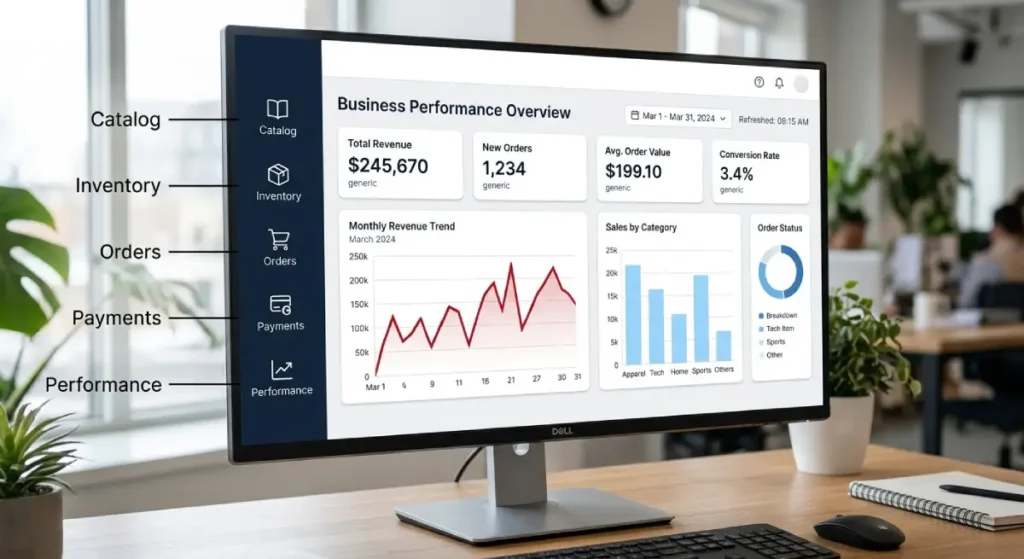
The navigation bar groups your tools: catalog, pricing and inventory, orders, payments and fees, and performance. Spend your first hour clicking through each section before listing anything.
Managing Products and Inventory
This is where you create listings, update prices, and adjust stock. Noon also offers a fees and revenue calculator. It estimates your fees, net revenue, and net margin per unit, so you can see which fulfillment method is most profitable. Use it before setting any price.
Managing Orders and Payments
Orders, shipping status, and returns live in the orders section. The “Payment and fees” tab holds your sales view and statements. The sales view shows consolidated sales per product, detailed commission data for any sale, and pending payments.
Tracking Sales and Business Performance
Check performance weekly. Watch cancellation rates, late shipments, and return reasons. Those numbers influence your standing long before sales volume does.
How to List Products on Noon Marketplace
Find Existing Products in the Noon Catalog
Search the catalog first. If your product already has a listing, you attach your offer to it instead of building a new page. This is common for branded goods.
Create New Product Listings
For products not in the catalog, you create a new listing from scratch. Products generally need EAN or UPC barcodes. If your goods have none, GS1 is the usual source.
Write SEO-Friendly Product Titles and Descriptions
Lead with brand, product type, key attribute, and size or color. Write for how shoppers actually search, and offer Arabic and English content where it fits your market. Keep it factual. Keyword-stuffed titles read badly and convert worse.
Upload High-Quality Product Images
Use clean, bright images on a plain background, with several angles. Noon is strict about image quality, and rejected images mean a delayed listing.
Add Product Specifications and Attributes
Fill in every attribute field, even optional ones. Complete attributes help Noon’s search and filters surface your product, and incomplete mapping is a frequent cause of rejection.
Set Product Prices and SKUs
Use a consistent SKU system from day one. Messy SKUs become a nightmare once you pass 50 products. Price after you’ve modeled fees, not before.
Submit Products for Listing Approval
Submit, then watch for rejection notices. Fix the stated issue and resubmit. Don’t just re-upload the same file and hope.
Choose the Right Noon Fulfillment Method
What Is Fulfilled by Noon (FBN)?
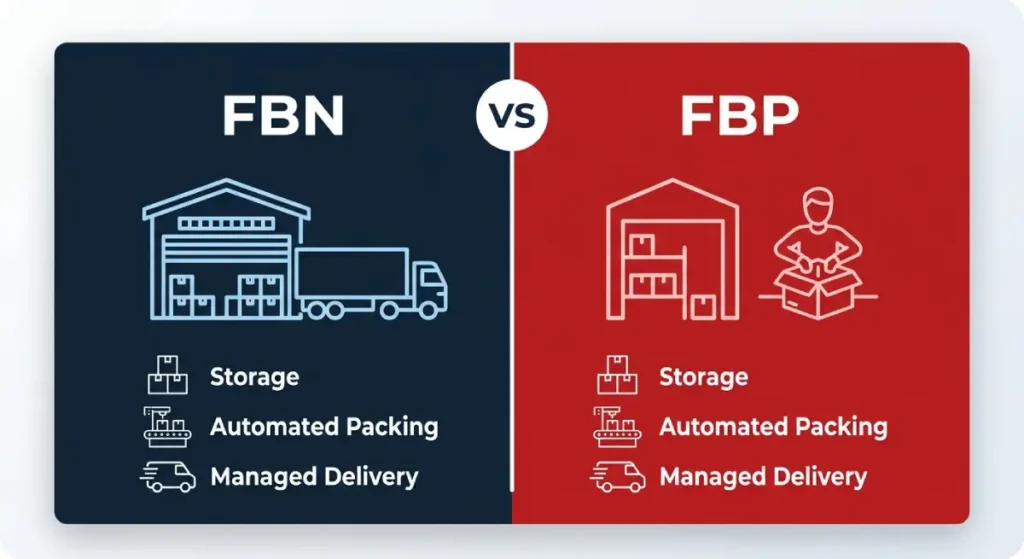
With FBN, you send stock to Noon’s warehouse, and Noon stores, picks, packs, ships, and handles delivery. Fees include a referral fee, an outbound fee based on shipping dimensions, and storage costs.
What Is Fulfilled by Partner (FBP)?
In FBP, inventory stays at the partner’s or seller’s own location. You pack and hand orders over for delivery. It suits sellers with their own warehouse or made-to-order products.
FBN vs. FBP: Key Differences
| Factor | FBN | FBP |
|---|---|---|
| Inventory location | Noon warehouse | Your own location |
| Packing and delivery | Noon | You or your courier arrangement |
| Storage fees | Yes | No |
| Upfront effort | Ship stock to Noon | Handle every order daily |
| Best for | Fast-moving, standard-size items | Bulky, custom, or low-volume items |
Which Noon Fulfillment Method Is Best for Your Business?
Run the numbers per product. Low-priced items can be squeezed by fixed outbound fees, while fast sellers often benefit from FBN speed and the badge. Many successful sellers split their catalog: FBN for winners and FBP for slow or bulky lines.
How Much Does It Cost to Sell on Noon Marketplace?
Noon Seller Commission Fees
Commission depends on category, brand, and country. The referral fee is charged per item based on category, brand, and business model , and varies by country. For reference, many “other” FBN categories in the UAE sit at 14%, while printers and accessories range from 5.5% to 12%. Always check the current fee schedule for your category.
Fulfillment and Shipping Fees
FBN charges an outbound fee per unit, based on weight and size. FBP sellers pay a logistics fee on shipments leaving their location. Compare both for your product’s dimensions.
Storage Fees and Other Charges
Storage in FBN is billed monthly on size in cubic feet and days stored. Items kept beyond 365 days incur a long-term storage fee. Penalties exist too. Seller-initiated cancellations, such as out-of-stock orders, carry a cancellation fee.
Noon Seller Payment and Settlement Process
Noon sends weekly statements. Sellers receive a weekly payment statement and a weekly fees invoice through Seller Lab. How the payout is processed depends on whether your weekly statement reaches AED/SAR 1,000.
How to Calculate Your Profit Margins
Use this simple formula per unit:
Profit = Selling price − product cost − commission − fulfillment fee − storage − inbound shipping − marketing
Example: a product sells for AED 150 and costs AED 60. Say commission is 14% (AED 21), outbound is AED 7, storage and inbound add AED 5, and ads add AED 8. Profit is AED 49, a margin of about 33%. Your numbers will differ, so run them in the calculator.
How to Manage Noon Orders and Inventory
Processing and Fulfilling Customer Orders
For FBP, confirm orders quickly and ship within the promised window. Late shipments hurt performance scores. FBN sellers mostly watch stock health.
Managing Inventory and Stock Levels
Stockouts cost twice: lost sales plus cancellation penalties. Reorder before you hit zero, and account for supplier lead times.
Handling Customer Returns and Refunds
Returns are part of marketplace life. Track reasons. If one SKU keeps coming back for “not as described,” fix the listing rather than blaming buyers.
Maintaining Seller Account Performance
Keep cancellations, late dispatches, and complaints low. Noon applies penalties for repeated breaches, and counterfeit goods carry serious consequences, so source only genuine stock.
How to Get Your First Sale on Noon Marketplace
Optimize Your Product Listings
Complete titles, attributes, and images beat clever copy. A finished listing outranks a creative but half-empty one.
Research Competitors and Product Pricing
Search your product on Noon and note the top five offers: price, delivery badge, review count. You don’t need to be cheapest, but you need a reason to be chosen.
Offer Competitive Prices and Discounts
A modest launch discount helps a new listing gather early orders. Just don’t discount below your break-even.
Maintain Product Availability
Keep stock available consistently. A listing that disappears and returns repeatedly loses momentum.
Use Noon Advertising and Promotions
Start with a small ad budget on your best-margin product. Join promotional campaigns only after checking that the discount still leaves profit.
10 Proven Tips to Increase Sales on Noon Marketplace
- Conduct proper product research. Validate demand before buying stock, and check seasonality.
- Choose profitable product categories. Compare commission rates, because a “hot” category with heavy fees can underperform a quieter one.
- Optimize product listings for Noon search. Use the terms shoppers type, in both languages where relevant.
- Use professional product images. Good images lift clicks more than almost any other tweak.
- Set competitive product prices. Include all fees in your floor price.
- Maintain sufficient inventory. Plan stock around Ramadan and major sale events.
- Use Noon advertising solutions. Scale only what’s already converting.
- Participate in Noon promotional campaigns. Pick campaigns where your margin survives the discount.
- Maintain positive customer feedback. Answer issues fast and package carefully.
- Monitor sales and performance reports. Review weekly and cut losers early.
Common Mistakes New Noon Sellers Should Avoid
Submitting Incomplete Business Documents
Expired licenses, wrong activities, and mismatched bank names top the rejection list.
Creating Poorly Optimized Product Listings
Thin titles and missing attributes bury your product in search.
Setting Incorrect Product Prices
Forgetting a fee line turns a “profitable” product into a loss.
Ignoring Inventory Management
Overstock raises storage fees, and understock raises cancellations.
Choosing the Wrong Fulfillment Method
FBN for cheap, bulky items can erase your margin. Test before committing.
Ignoring Customer Returns and Seller Performance
Performance problems compound quietly. Review them weekly.
Is Selling on Noon Marketplace Worth It?
Benefits of Selling on Noon
You get access to a large Gulf and Egyptian customer base, built-in logistics through FBN, and regionally relevant payment and delivery options.
Challenges New Sellers Should Understand
Competition is real, category fees can be heavy, and compliance differs by country. Content and image standards are strict too.
Who Should Start Selling on Noon?
Sellers with a valid trade license, tested products, and realistic margins. If you’re still validating a product idea, start small with a handful of SKUs.
Frequently Asked Questions
How much does it cost to sell on Noon?
There is no single price. You pay a category-based commission, plus fulfillment, storage, and any optional advertising. Use Noon’s fees calculator to model your exact product before listing.
Can I sell on Noon without a trade license?
For UAE and KSA, generally no. A valid license covering trading or sales activities is required. Egypt offers an individual seller route using a Data Certificate.
How long does Noon seller registration take?
It depends on document quality and review queues. Clean, correct submissions move fastest, while rejections add days or weeks. I couldn’t find an official guaranteed timeline, so treat any fixed promise with caution.
How does Noon pay its sellers?
Through weekly statements covering sales, returns, and fees, paid to the bank account on file.
Can I sell on Noon without keeping inventory?
You still need stock somewhere, either at Noon’s warehouse (FBN) or your own site (FBP). For China-based sellers, the Global Shipping program changes the logistics model.
Is selling on Noon better than Amazon?
Neither is universally better. Noon is strong in the Gulf and Egypt, while Amazon has different reach and fee structures. Compare fees, category competition, and your target customers.
How can I become a successful Noon seller?
Start with correct documents, then add clean listings, tested pricing, reliable stock, and weekly performance reviews.
Conclusion
Selling on Noon isn’t complicated, but it punishes sloppiness. Approval hinges on valid licenses, matching names, and the right tax details. Profit hinges on fees you calculate before pricing, not after your first statement arrives.
Treat your first month as a test. List a few strong products, pick the fulfillment model that fits their size and price, and read your weekly statements line by line. Fix listings that underperform, and protect your account score by shipping on time.
If you’d rather skip the trial-and-error, eCcommerce Apex offers Noon Marketplace Account Management Services: registration support, listing optimization, pricing and fee analysis, and ongoing performance management.
Ready to launch with confidence? Contact eCommerce Apex today and get your Noon store set up the right way.