
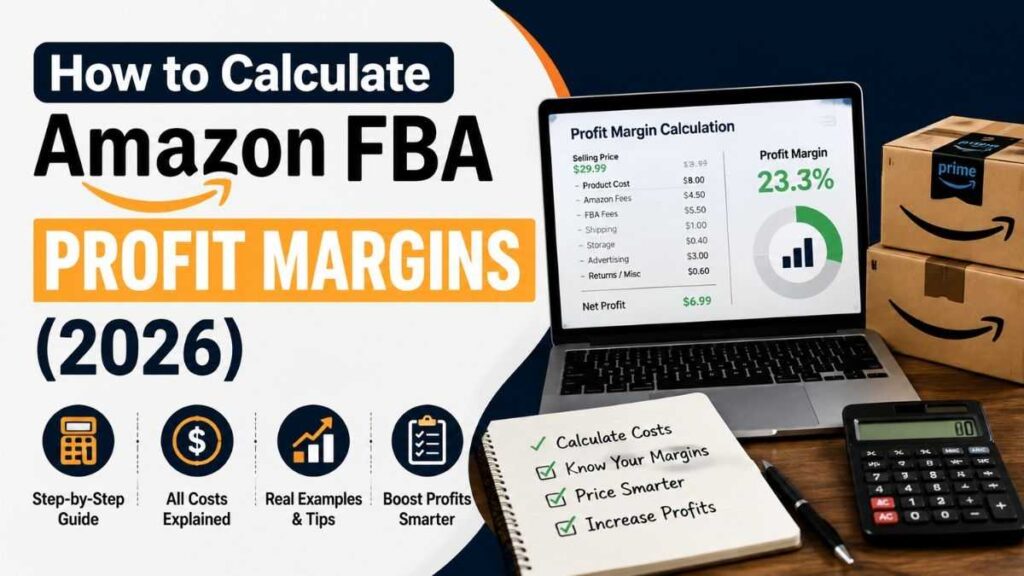
Selling a product for $30 on Amazon does not mean you are making $30—or even close to it.
Between product costs, Amazon referral fees, FBA fulfillment, storage, advertising, returns, and other expenses, your actual profit can be much smaller than your sales revenue suggests. That is why understanding your Amazon FBA profit margin is one of the most important parts of running a profitable Amazon business.
The good news is that the calculation is not complicated once you know which numbers to include.
In this guide, you’ll learn how to calculate Amazon FBA profit margins step by step, what costs can reduce your margin, how to calculate your break-even price, and how to decide whether a product is worth selling.
Quick answer: Your Amazon FBA profit margin is your net profit divided by your selling price, multiplied by 100. To calculate it accurately, subtract your product cost, Amazon fees, FBA fees, advertising, shipping, returns, and other relevant expenses from your revenue.
What Is Amazon FBA Profit Margin?
Your Amazon FBA profit margin tells you how much money you keep from each sale after accounting for your business expenses. For an Amazon seller, this amazon seller profit margin shows how much of the selling price remains after the costs of running the business are deducted.
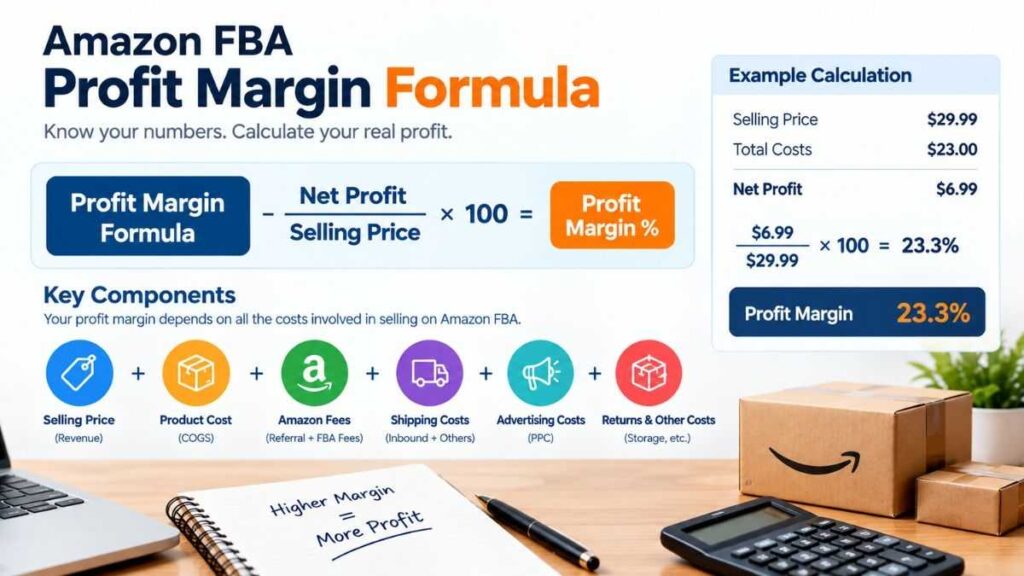
The basic formula is:
Amazon FBA Profit Margin = (Net Profit ÷ Selling Price) × 100
For example, suppose you sell a product for $30 and all of your costs add up to $21.
Your profit is:
$30 − $21 = $9
Your profit margin is:
$9 ÷ $30 × 100 = 30%
So your Amazon FBA profit margin would be 30%.
This is different from simply looking at revenue. A product can generate $50,000 in monthly sales while producing relatively little profit if fees, advertising, inventory, and other costs are too high.
Profit margin vs. markup
These two terms are often confused.
Profit margin measures profit as a percentage of your selling price.
Markup measures profit compared with your product cost.
For example, if your product costs $10 and you sell it for $20:
- Profit = $10
- Profit margin = 50%
- Markup = 100%
For Amazon sellers, profit margin is usually the more useful number because it shows how much of your actual sales revenue remains after expenses. Understanding amazon gross profit margin can also help sellers distinguish between product-level profitability and the amount left after all operating expenses.
Amazon FBA sellers should regularly monitor their fees, sales, and account performance through Amazon Seller Central to understand their overall profitability.
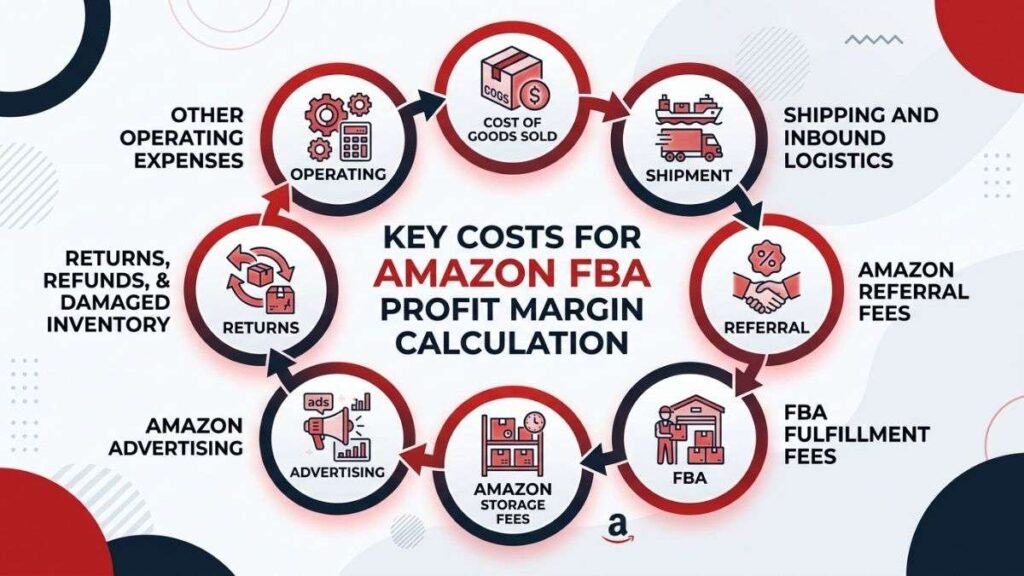
What Costs Should You Include in an Amazon FBA Profit Margin Calculation?
A realistic margin calculation needs more than the Amazon referral fee. Using an fba fee calculator can help estimate the different Amazon fees that affect your product’s overall profitability.
Amazon’s current US selling structure includes selling-plan fees and referral fees. The Professional selling plan is currently $39.99 per month, while the Individual plan is $0.99 per item sold, in addition to applicable selling fees. Referral fees vary by product category.
FBA adds fulfillment and storage costs, while advertising and other business expenses can further reduce your actual profit.
Here are the major costs to consider.
1. Cost of goods sold (COGS)
This is what you pay your supplier to manufacture or purchase the product.
Include costs such as:
- Product purchase price
- Manufacturing costs
- Custom packaging
- Product labels
- Inspection costs
- Special preparation
- Other per-unit sourcing expenses
If your supplier charges $7 per unit, your basic product cost is $7—but your true landed cost may be higher.
2. Shipping and inbound logistics
Getting inventory from your supplier to Amazon is another expense.
Depending on your business, this can include:
- International shipping
- Freight
- Customs duties
- Import taxes
- Local transportation
- Freight forwarding
- Preparation before sending inventory to Amazon
A product that looks profitable using factory cost alone may become much less attractive after shipping and import costs are included.
3. Amazon referral fees
Amazon charges a referral fee on products sold through its marketplace. The percentage varies depending on the product category.
For example, Amazon currently lists 15% referral fees for several major categories, including Home & Kitchen, Sports & Outdoors, Toys & Games, and Tools & Home Improvement. Other categories have different rates.
Always check the current fee for your exact category rather than assuming every product has the same percentage. An amazon selling fee calculator can help you estimate the applicable selling fees before you finalize your pricing.
4. FBA fulfillment fees
FBA fulfillment fees cover services associated with fulfilling customer orders, including picking, packing, shipping, customer service, and returns.
The amount depends on factors such as product size and weight.
This is one reason product dimensions can have a major impact on profitability. A fba fulfillment fees calculator can help estimate fulfillment costs based on factors such as product size and weight.
Two products selling for $30 can have very different margins if one is small and lightweight while the other is large and heavy.
5. Amazon storage fees
FBA inventory is stored in Amazon’s fulfillment network, and storage charges are based on the space your inventory occupies.
Amazon states that monthly storage costs are calculated using the daily average volume of inventory in cubic feet.
Slow-moving inventory can therefore hurt your margin even when individual sales appear profitable. An amazon fba storage fees calculator can help sellers estimate storage costs when evaluating inventory profitability.
6. Amazon advertising
Advertising is another major expense for many sellers.
You may spend money on:
- Sponsored Products
- Sponsored Brands
- Sponsored Display
- Product launches
- Promotional campaigns
Advertising should be included when calculating your real Amazon FBA profit margin.
A product might show a 35% margin before advertising but only 18% after advertising.
7. Returns, refunds, and damaged inventory
Returns are part of selling online.
Depending on your product and category, you may experience:
- Customer returns
- Refunds
- Damaged units
- Unsellable inventory
- Replacement costs
- Return processing expenses
Amazon also notes that sellers can encounter additional costs such as aged inventory surcharges, disposal orders, and other FBA-related expenses.
8. Other operating expenses
For a more complete calculation, consider:
- Software subscriptions
- Product photography
- Design
- Virtual assistants
- Accounting
- Trademark expenses
- Brand Registry-related costs
- Business insurance
- Professional services
Not every expense needs to be assigned to one individual product, but your overall business profitability should account for them.
How to Calculate Amazon FBA Profit Margin Step by Step
Let’s work through a realistic example.
Imagine you sell a product for $29.99.
Your estimated per-unit costs are:
| Cost | Amount |
|---|---|
| Selling price | $29.99 |
| Product cost | $8.00 |
| Inbound shipping | $1.00 |
| Amazon referral fee | $4.50 |
| FBA fulfillment | $5.50 |
| Storage | $0.40 |
| Advertising | $3.00 |
| Returns/miscellaneous | $0.60 |
| Total costs | $23.00 |
Your estimated profit is:
$29.99 − $23.00 = $6.99
Now calculate the margin:
$6.99 ÷ $29.99 × 100 = 23.3%
Your estimated Amazon FBA profit margin is therefore approximately 23.3%.
This example demonstrates why looking only at the product cost is misleading.
The product costs $8, but the business does not make $21.99 per sale. Amazon fees, fulfillment, advertising, storage, and other expenses consume a significant portion of the selling price.
How to Calculate Amazon FBA Break-Even Price
Knowing your profit margin is useful, but knowing your break-even price can be even more valuable. An amazon selling price calculator can help you test different prices and determine whether a product can remain profitable after Amazon fees and other costs.
Your break-even price is the selling price at which your revenue covers your costs without producing a profit or loss.
A simplified calculation is:
Break-even revenue = Total costs
However, Amazon fees can be percentage-based, so the actual calculation may require more detailed modeling.
For example, imagine your non-referral costs total $15 per unit and Amazon’s referral fee is 15%.
You need to solve:
Selling Price − 15% of Selling Price − $15 = $0
That means:
0.85 × Selling Price = $15
So:
Selling Price ≈ $17.65
At roughly $17.65, you would break even under those assumptions.
If you want a 25% profit margin instead, the target price needs to be higher.
This is why sellers should calculate profitability before launching a product, rather than discovering after launch that the current market price does not leave enough room for profit.
What Is a Good Amazon FBA Profit Margin?
There is no universal “good” Amazon FBA profit margin.
A margin that works for one business may be too low for another.
For example, a seller with low advertising costs, fast inventory turnover, and strong repeat purchases may be comfortable with a lower margin. A new private-label seller spending heavily on advertising and promotions may need considerably more room.
As a practical planning framework:
- Below 10%: Often leaves little room for unexpected costs.
- 10–20%: Can work, but cost control becomes particularly important.
- 20–30%: Provides more breathing room for many product businesses.
- 30%+: Gives you stronger protection against cost increases, discounts, and advertising fluctuations.
These are planning ranges, not Amazon rules or guarantees.
The more important question is:
Can the product generate enough profit after all realistic costs while maintaining healthy sales volume and cash flow?
A 15% margin on a fast-moving product can potentially produce more total profit than a 40% margin on a product that barely sells.
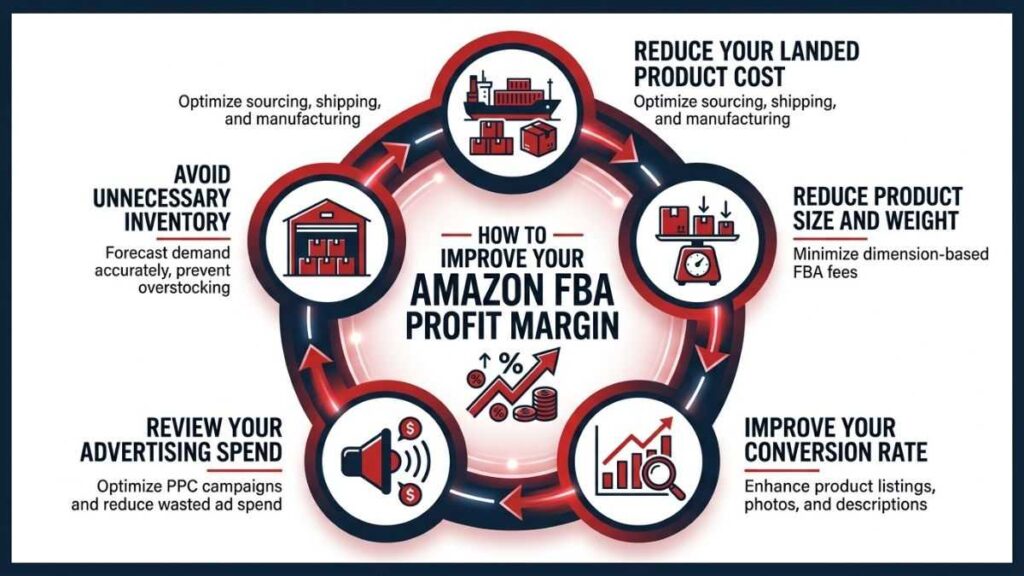
How to Improve Your Amazon FBA Profit Margin
If your current margin is too low, you do not necessarily need to abandon the product.
Start by identifying the biggest expense.
Reduce your landed product cost
Ask suppliers about:
- Larger order quantities
- Different materials
- Simpler packaging
- Better shipping arrangements
- Alternative manufacturers
Even a $1 reduction in landed cost can have a significant impact when you sell thousands of units.
Reduce product size and weight
Product dimensions matter because FBA fulfillment costs depend partly on size and weight.
Consider whether you can:
- Reduce packaging
- Remove unnecessary inserts
- Use a smaller box
- Redesign the product
- Reduce empty space
A packaging redesign can sometimes improve margins without increasing the selling price.
Improve your conversion rate
Advertising is easier to justify when your listing converts well.
Improve:
- Main product image
- Product photography
- Title
- Bullet points
- A+ Content
- Reviews and ratings
- Product positioning
A higher conversion rate can potentially reduce wasted advertising spend and improve organic sales.
Review your advertising spend
Do not look only at sales generated by advertising.
Track metrics such as:
- ACoS
- TACoS
- Advertising cost per order
- Organic sales
- Total contribution margin
A campaign producing sales is not automatically profitable.
Avoid unnecessary inventory
Inventory that sits in an Amazon fulfillment center ties up cash and can increase storage-related expenses.
Amazon provides tools such as its Revenue Calculator and Seller Central fee-preview tools to help sellers estimate costs and evaluate inventory economics.
Use the Amazon FBA Revenue Calculator Before Launching
One of the easiest ways to estimate your Amazon FBA profit margin is Amazon’s own FBA Revenue Calculator.
Amazon says the tool can compare FBA with other fulfillment methods and estimate costs, revenue, net profit, and margins.
You can enter information such as:
- Selling price
- Product dimensions
- Product weight
- Product category
- Cost of goods
- Storage assumptions
- Fulfillment method
- Other costs
Amazon’s calculator is useful for estimates, but remember that actual costs can vary. Amazon itself describes the calculator results as estimates.
You can also create supporting content around:
- Amazon FBA fees
- Amazon PPC costs
- Amazon product research
- FBA vs. FBM
- Amazon seller fees
- Amazon break-even calculator
- Private-label product research
These related pages can create a strong internal-linking structure around your main FBA profitability topic.
Amazon FBA Profit Margin Example for a New Seller
Let’s look at a second example to see how pricing affects profitability.
Suppose a seller launches a kitchen product at $24.99.
Estimated costs:
- Product and packaging: $6.50
- Inbound shipping: $1.25
- Referral fee: $3.75
- FBA fulfillment: $4.75
- Storage allocation: $0.35
- Advertising: $2.75
- Returns and miscellaneous: $0.50
Total estimated costs:
$19.85
Estimated profit:
$24.99 − $19.85 = $5.14
Profit margin:
$5.14 ÷ $24.99 × 100 ≈ 20.6%
Now imagine the seller negotiates the product cost down by $1.
New profit:
$6.14
New margin:
≈ 24.6%
That one-dollar improvement increases the margin by about four percentage points.
This is why experienced sellers often focus on several small improvements rather than relying on a single major change.
Common Amazon FBA Profit Margin Mistakes
Calculating profit before advertising
This is one of the most common mistakes. If advertising is essential to generate sales, it belongs in your profitability model.
Ignoring shipping to Amazon
Supplier pricing is not necessarily your true landed cost. Include the cost of getting inventory from the supplier to the Amazon fulfillment network.
Using outdated Amazon fees
Amazon fees can change, and different marketplaces have different fee structures. Always verify current fees before making a major product decision.
Confusing revenue with profit
$100,000 in sales does not mean $100,000 in profit. Revenue is the money generated from sales. Profit is what remains after expenses.
Ignoring cash flow
A product can be profitable on paper but still create cash-flow problems if you need to purchase large quantities of inventory before receiving payment from sales. Profitability and cash flow should be monitored separately.
FAQ: Amazon FBA Profit Margin
What is a good Amazon FBA profit margin?
There is no fixed ideal margin. As a general planning benchmark, many sellers aim for enough margin to comfortably absorb advertising, returns, discounts, and unexpected costs. A 20–30% net margin can provide useful breathing room, but the right target depends on the product and business model.
How do I calculate my Amazon FBA profit margin?
Subtract all relevant costs from your selling price to determine net profit. Then divide net profit by selling price and multiply by 100.
Profit margin = (Selling price − total costs) ÷ selling price × 100
Does Amazon FBA include shipping?
FBA fulfillment covers services associated with picking, packing, shipping, customer service, and returns, but sellers still need to consider other logistics costs, including getting inventory into Amazon’s fulfillment network.
Does Amazon advertising reduce FBA profit margin?
Yes. Advertising is a business expense, so it reduces the amount you keep from each sale. For a realistic profitability calculation, include your expected advertising cost rather than calculating margin using Amazon fees alone.
Can I make $1,000 a month selling on Amazon?
Yes, it’s realistic. At a net profit of $5 per unit, selling about 200 units a month gets you to $1,000. A $25 product at a 20% Amazon FBA profit margin earns exactly that $5. Reaching 200 monthly sales usually takes a few months of testing, ads, and reviews, so treat it as a goal, not a promise.
Is a 75% profit margin good on Amazon?
It’s excellent, but it’s rare. A 75% figure is usually gross margin (sale price minus product cost only). After referral fees, fulfillment, storage, ads, and returns, most FBA products land far lower. If your real net margin really is that high, expect competitors to notice and copy the product quickly.
Is Amazon FBA still a profitable business?
Yes, but it’s tougher than it was a few years ago. Competition, ad costs, and fees keep rising, so thin-margin products struggle. Sellers who pick differentiated products, track every cost, and keep their net FBA profit margin above 20% still do well.
How much does Amazon take from a $100 sale?
Often around 30% to 40%, depending on category, size, and weight. As an illustration: a 15% referral fee is $15, an FBA fulfillment fee might be $6 to $10, and storage adds a dollar or two. Ads can add another $10 or so. Referral rates differ by category, so check your exact numbers in Seller Central.
How Much Can You Make Selling on Amazon?
Your potential income depends on factors such as product demand, selling price, profit margin, sales volume, advertising costs, and operating expenses. Some sellers may earn a few hundred dollars per month, while established businesses can generate significantly more. The most important factor is not total sales, but how much profit remains after all of your costs are paid.
Is FBA more profitable than FBM?
Not automatically. FBA can simplify fulfillment and provide access to Amazon’s fulfillment infrastructure, while FBM may offer lower costs for certain products or businesses. Amazon’s Revenue Calculator allows sellers to compare fulfillment scenarios before making a decision.
Final Thoughts: Calculate Before You Sell
A strong Amazon business starts with numbers—not just a product that looks popular.
Your Amazon FBA profit margin should account for the complete cost of selling a product, including inventory, inbound shipping, referral fees, FBA fulfillment, storage, advertising, returns, and other relevant expenses.
Before investing in inventory, run several scenarios:
- Your expected selling price
- A lower selling price
- Your estimated advertising cost
- A higher advertising-cost scenario
- Your break-even price
- Your expected net profit
- Your cash required for inventory
Amazon’s FBA Revenue Calculator can help estimate FBA costs and compare fulfillment options, while Seller Central’s fee-preview tools can help you review estimated fees for your inventory.
The goal isn’t simply to find a product with a high margin. It’s to find a product that can maintain a healthy margin while selling consistently and generating enough cash flow to grow.
If you’re evaluating an Amazon FBA product in 2026, calculate the numbers before placing your purchase order. A few minutes of careful margin analysis can prevent thousands of dollars in inventory from being tied up in a product that was never profitable in the first place.