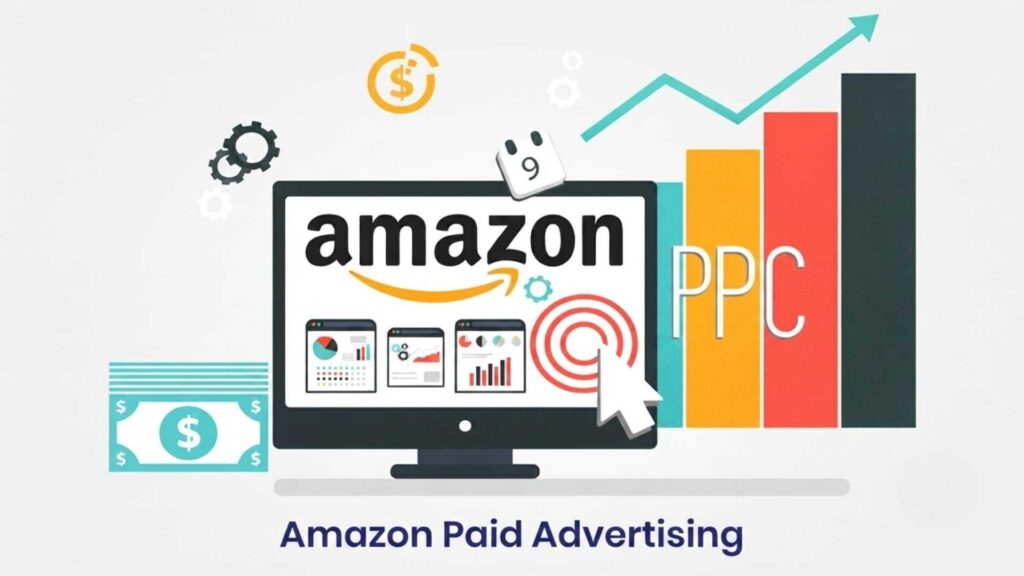
If you’ve ever searched for a product on Amazon and noticed the first few listings say “Sponsored,” you’ve already seen Amazon PPC in action. But how does Amazon PPC work behind the scenes, and why do so many sellers pour their marketing budget into it?
Amazon Pay-Per-Click (PPC) advertising is the engine that drives visibility for millions of products on the world’s largest online marketplace. It’s not magic, and it’s not luck — it’s a structured system built on bidding, relevance, and performance data. Once you understand the mechanics, you can turn a confusing cost center into a predictable growth channel.
In this guide, you’ll learn exactly what Amazon PPC is, how the ad auction works, the campaign types and targeting options available, the metrics that matter, and a practical 30-day plan to launch your first campaigns with confidence. Whether you’re brand new to selling on Amazon or looking to sharpen an existing strategy, this article breaks it down step by step in plain language.
What Is Amazon PPC?
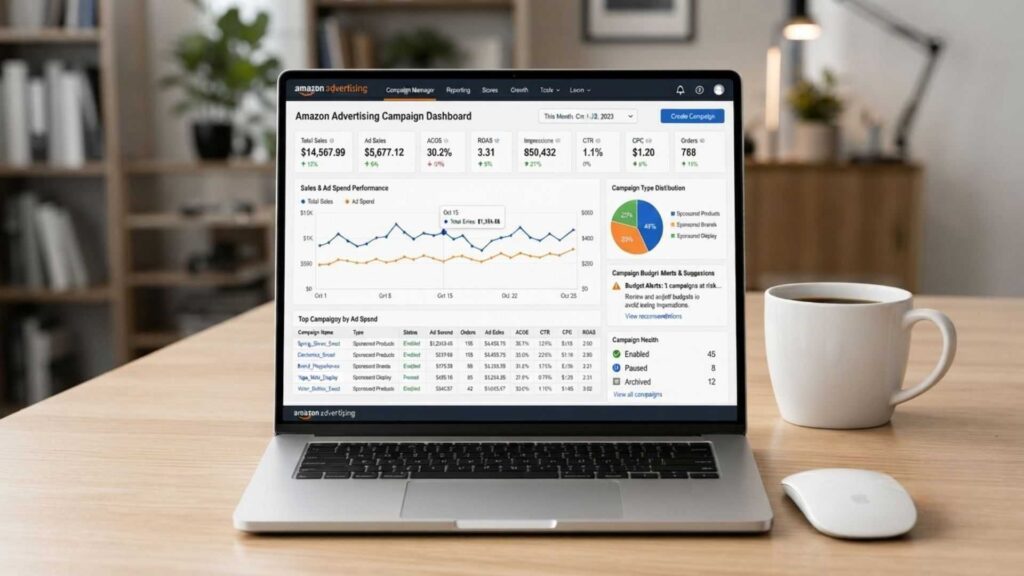
Amazon PPC advertising allows sellers and brands to promote their products through paid placements across Amazon search results and product detail pages.
“Pay-per-click” means you’re only charged when a shopper actually clicks your ad not simply for it being shown.
These ads blend into the shopping experience. A Sponsored Products ad, for example, looks almost identical to an organic listing, just with a small “Sponsored” label. That’s intentional: Amazon wants ads to feel like a natural part of browsing, not an interruption.
At its core, Amazon PPC exists to solve a simple problem for sellers: new or lesser-known products struggle to rank organically because Amazon’s algorithm favors listings with strong sales history and reviews. PPC gives you a way to buy visibility while you build that history.
“Looking to improve your Amazon advertising performance? Explore our Amazon PPC Management Services for expert campaign management and optimization.”
Why Amazon PPC Matters
A well-planned Amazon PPC strategy can help sellers increase visibility, generate sales, and collect valuable advertising data. For most catalogs, PPC isn’t just an add-on to your Amazon strategy. it’s a core part of how visibility and sales are earned.
Here’s why PPC has become close to essential for serious sellers:
- Instant visibility. Your product can appear on page one the moment a campaign goes live, without waiting for organic ranking to build.
- Sales velocity feeds the algorithm. Amazon’s A9/A10 ranking system rewards listings that convert well. PPC-driven sales can help boost organic rank over time.
- Data you can’t get anywhere else. PPC search term reports reveal exactly what shoppers type before buying your product — insight you can reuse for listing optimization and organic SEO.
- Defensive positioning. If you don’t advertise on your own brand name or top keywords, competitors often will, potentially stealing your traffic.
Combining Amazon SEO and PPC can help sellers generate paid traffic while building stronger organic visibility over time.
How Does Amazon PPC Work? (Step-by-Step)
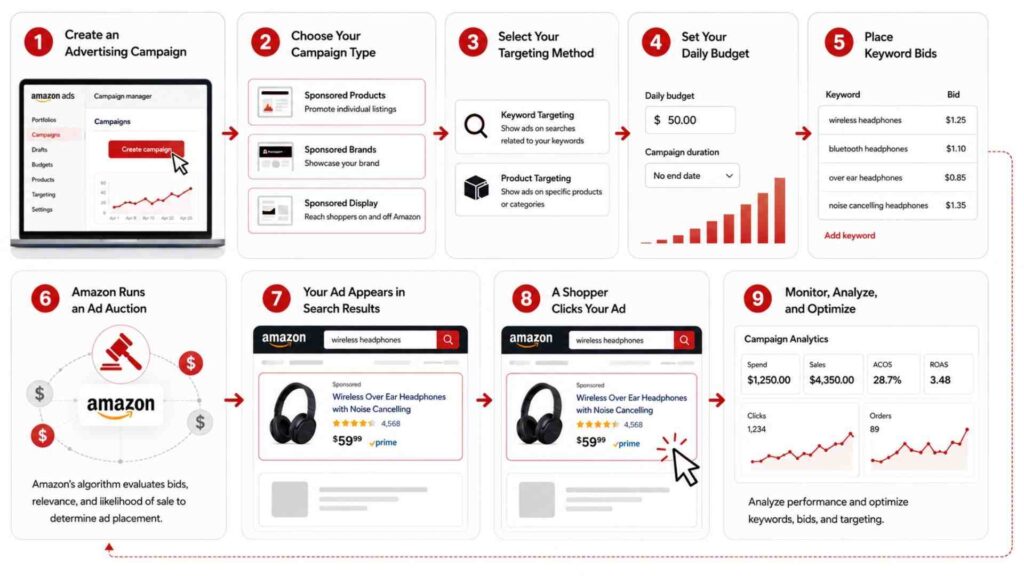
Amazon PPC follows a straightforward process, but each step plays an important role in determining campaign performance. From choosing the right keywords to winning ad placements, every decision affects how often your ads are shown and how much you ultimately spend.
Let’s walk through the process step by step.
Step 1: Create an Advertising Campaign
The first step is to create an Amazon PPC campaigns and select the product you want to advertise.
From there, you’ll create a new campaign and choose the type of advertisement you want to run, such as Sponsored Products, Sponsored Brands, or Sponsored Display.
At this stage, you’ll also select the products (ASINs) you want to advertise and assign a campaign name for easy tracking.
Effective Amazon PPC campaign management requires separating campaigns based on targeting, performance, and profitability.
Step 2: Choose Your Campaign Type
Next, decide which campaign format best aligns with your goals.
For example:
- Sponsored Products are ideal for driving direct sales of individual products.
- Sponsored Brands help increase brand awareness and showcase multiple products.
- Sponsored Display allows you to retarget shoppers and reach audiences both on and off Amazon.
Many sellers start with Sponsored Products because they are simple to set up and typically deliver the strongest return for beginners.
Step 3: Select Your Targeting Method
Amazon PPC targeting determines which searches, products, or shoppers can see your ads.
- Automatic Targeting: Amazon chooses relevant search terms based on your product listing.
- Manual Targeting: You choose the exact keywords or products you want to target.
Automatic campaigns are useful for discovering high-performing search terms, while manual campaigns provide greater control and precision.
Many experienced advertisers use both methods together to maximize results.
Step 4: Set Your Daily Budget
Before your campaign goes live, your Amazon PPC daily budget determines how much you’re willing to spend on advertising each day.
For example:
- $10/day for testing new products
- $25/day for growing listings
- $50+/day for competitive products
Amazon will never intentionally exceed your average daily budget over the billing period, giving you predictable advertising costs.
Choosing a realistic budget ensures your campaigns can collect enough data for optimization.
Step 5: Place Keyword Bids
For each keyword or product target, you’ll specify the maximum amount you’re willing to pay when someone clicks your ad.
This amount is called your bid.
Higher bids generally improve your chances of winning ad placements, but relevance, listing quality, and competition also influence results.
Finding the right balance between competitive bids and profitability is one of the most important aspects of Amazon PPC management.
Step 6: Amazon Runs an Ad Auction
Every time a shopper searches for a product, Amazon instantly conducts an advertising auction.
Advertisers competing for that keyword enter the auction, and Amazon evaluates several factors before deciding which ads to display.
These include:
- Your keyword bid
- Product relevance
- Historical click-through rate
- Expected conversion rate
- Overall listing quality
Contrary to popular belief, the highest bidder doesn’t always win. Amazon prioritizes ads that are both relevant and likely to deliver a positive shopping experience.
Step 7: Your Ad Appears in Search Results
If your ad wins the auction, it may appear in high-visibility locations, such as:
- Top of Amazon search results
- Middle of search results
- Product detail pages
- “Sponsored” product sections
These premium placements increase the likelihood that shoppers will notice and click on your product.
Step 8: A Shopper Clicks Your Ad
When a customer clicks your sponsored listing, they’re taken directly to your product detail page.
This is why having an optimized listing is essential. High-quality images, compelling titles, persuasive bullet points, and positive reviews all improve the chances of turning clicks into sales.
Remember, you pay only when someone clicks your ad—not when it’s displayed.
Step 9: Monitor, Analyze, and Optimize
Amazon PPC isn’t a “set it and forget it” strategy.
Successful sellers review campaign performance regularly by analyzing metrics like impressions, clicks, CTR, CPC, ACOS, ROAS, and conversion rates.
Based on this data, they make informed adjustments, such as:
- Increasing bids on high-converting keywords
- Lowering bids on expensive, low-performing terms
- Adding negative keywords to eliminate wasted spend
- Refining product targeting
- Testing new keyword opportunities
Continuous optimization helps improve efficiency, reduce advertising costs, and maximize long-term profitability.
Amazon PPC Workflow
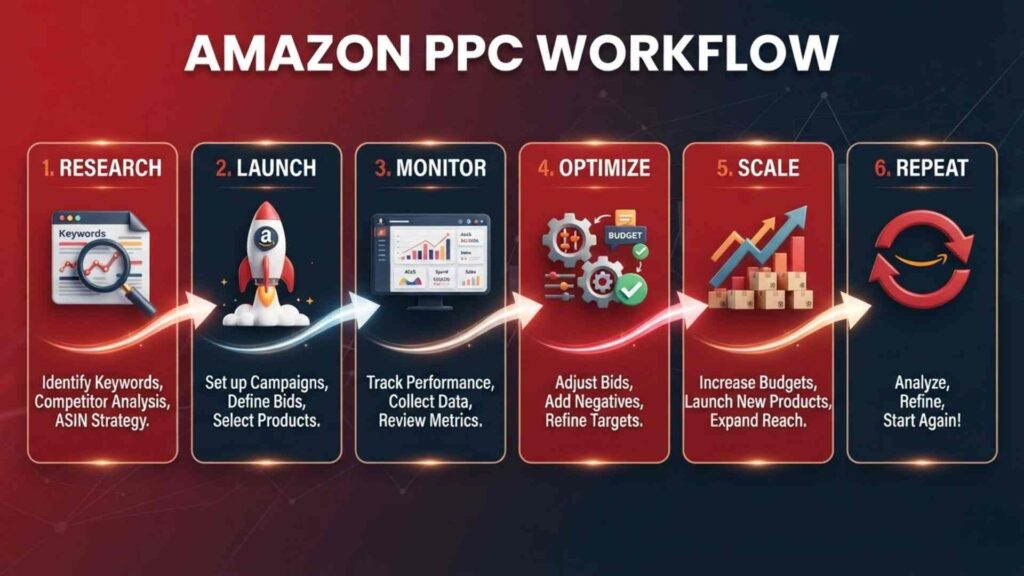
Zooming out, the ongoing workflow looks like a cycle rather than a one-time setup:
- Research — identify keywords and products worth targeting
- Launch — build campaigns with sensible starting bids and budgets
- Monitor — track spend, clicks, and sales daily during the early period
- Optimize — adjust bids, pause underperformers, add negative keywords
- Scale — increase budget and bids on proven winners
- Repeat — revisit the cycle weekly or monthly as new data comes in
This loop never really stops. Amazon PPC rewards sellers who treat it as an ongoing process, not a set-it-and-forget-it task.
Amazon PPC Campaign Types
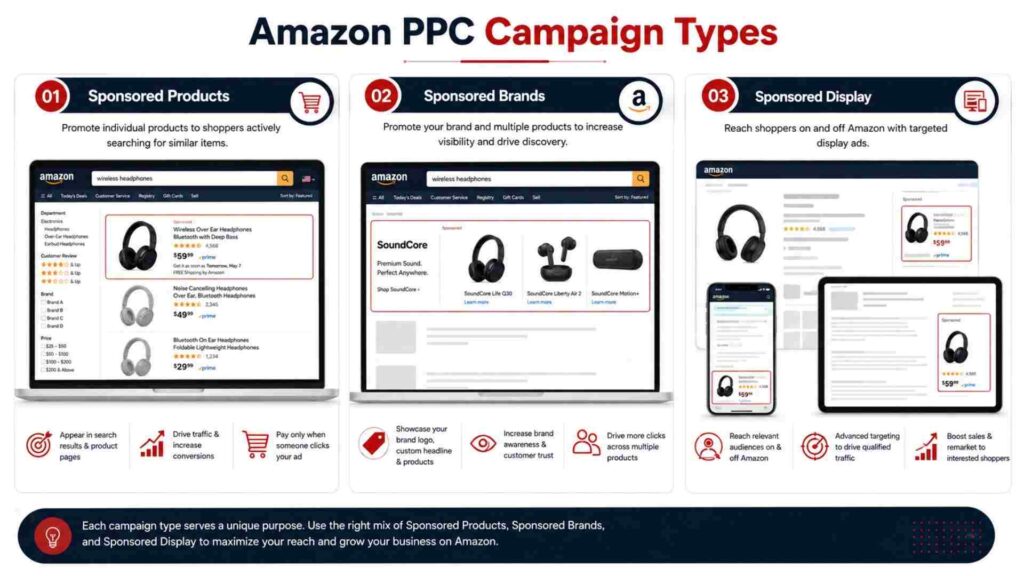
Amazon offers three main PPC campaign types, each designed for a different advertising goal. Choosing the right one depends on whether you want to increase sales, build brand awareness, or reconnect with interested shoppers.
Sponsored Products
Sponsored Products are the most common Amazon PPC ads. They promote individual products and appear in search results and on product detail pages, making them ideal for driving sales.
Best For
- New sellers
- Product launches
- Increasing sales
- Improving organic rankings
Advantages
- Easy to set up
- High visibility
- Supports automatic and manual targeting
- High conversion potential
Limitation
- Promotes only individual products
Best Choice for Beginners: Sponsored Products are the easiest and most effective campaign type for new Amazon sellers.
Sponsored Brands
Sponsored Brands showcase your logo, a custom headline, and multiple products at the top of Amazon search results. They’re ideal for increasing brand visibility and driving traffic to your Amazon Store.
Best For
- Brand awareness
- Product collections
- Amazon Store traffic
Advantages
- Premium search placement
- Promotes multiple products
- Strengthens brand recognition
Limitation
Sponsored Display
Sponsored Display ads help you reach shoppers both on and off Amazon. They’re especially useful for retargeting customers who viewed your products but didn’t make a purchase.
Best For
- Remarketing
- Brand awareness
- Cross-selling products
Advantages
- Audience-based targeting
- Retargeting capabilities
- Extends reach beyond Amazon
Limitation
- More advanced than other campaign types
Amazon PPC Campaign Comparison
| Feature | Sponsored Products | Sponsored Brands | Sponsored Display |
|---|---|---|---|
| Best For | Product sales | Brand awareness | Retargeting |
| Promotes | Single product | Multiple products | Products & audiences |
| Placement | Search & product pages | Top of search | Amazon & external sites |
| Brand Registry Required | No | Yes | Usually Yes |
| Beginner Friendly | ⭐⭐⭐⭐⭐ | ⭐⭐⭐ | ⭐⭐⭐ |
Tip: If you’re just starting with Amazon PPC, begin with Sponsored Products. Once you gain experience, expand your strategy by adding Sponsored Brands and Sponsored Display campaigns.
PPC can also support sellers operating an Amazon Wholesale FBA business by helping them increase visibility for competitive products.
Amazon PPC Targeting Options
Targeting determines who sees your ads. Choosing the right targeting strategy helps you reach shoppers who are most likely to buy your products.
Amazon offers several targeting methods that can be used individually or together.
Automatic Targeting
Amazon’s algorithm matches your ad to relevant search terms and products based on your listing content. This is a great starting point for gathering data, especially in your first few weeks, since it reveals which real customer searches convert.
Manual Targeting
You select specific keywords or products yourself, giving you full control. Manual targeting splits further into:
- Keyword targeting — bidding on search terms, using broad, phrase, or exact match types
- Product targeting — bidding to appear on specific competitor or complementary product pages and categories
Most experienced sellers run a mix: automatic campaigns for discovery, manual campaigns for precision once winning keywords are identified.
Keyword Targeting
Keyword Targeting displays your ads when shoppers search for specific terms. Amazon supports four keyword match types.
Broad Match
Reaches the widest audience by showing ads for related search terms. Ideal for discovering new keyword opportunities.
Phrase Match
Shows ads when the search contains your keyword phrase in the correct order. It offers a balance between reach and relevance.
Exact Match
Displays ads only for searches that closely match your keyword, delivering higher relevance and often better conversion rates.
Negative Keywords
Prevent your ads from appearing for irrelevant searches, helping reduce wasted ad spend and improve campaign efficiency.
Product Targeting
Instead of targeting keywords, Product Targeting places your ads on specific product pages or within selected categories.
ASIN Targeting
Target competitor product pages to attract shoppers comparing similar products.
Category Targeting
Show ads across an entire product category and refine targeting by factors such as price, brand, Prime eligibility, or customer ratings.
Tip: Start with Automatic Targeting to discover high-performing search terms, then move those keywords into Manual Targeting campaigns for better control and improved profitability.
What Is an Amazon Ad Auction?
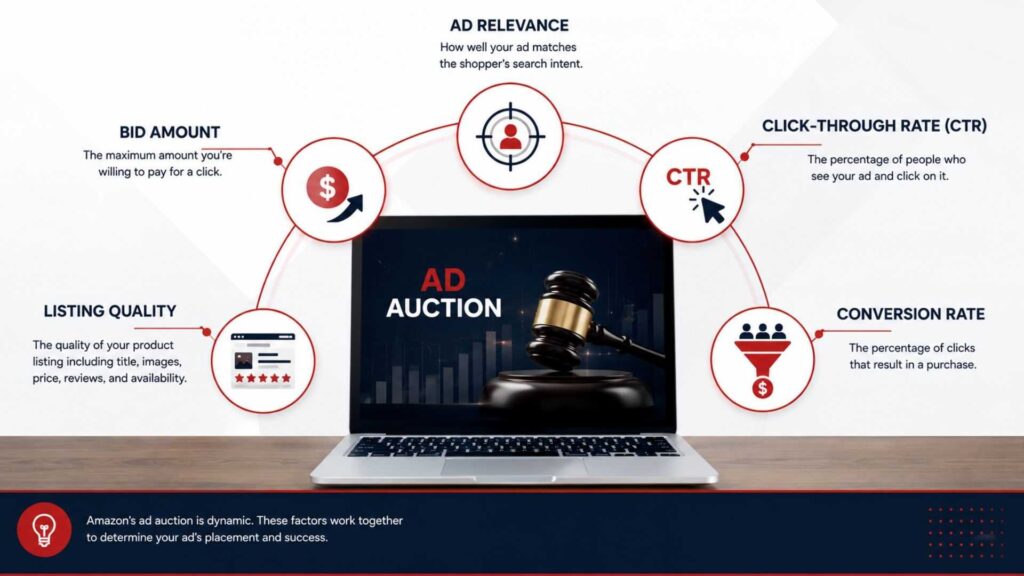
An Amazon ad auction is the automated process that selects which sponsored ads appear in search results and on product pages. Every eligible advertiser competes, and Amazon ranks ads based on relevance and performance not just the bid amount.
Factors That Influence the Auction
Amazon evaluates several factors before displaying an ad, including:
- Bid Amount – Your maximum cost per click (CPC)
- Ad Relevance – How well your product matches the search query
- Click-Through Rate (CTR) – Ads that receive more clicks are considered more relevant
- Conversion Rate – Products that generate more sales are favored
- Listing Quality – Optimized titles, images, and reviews improve ad performance
Why the Highest Bid Doesn’t Always Win
Amazon wants to show ads that shoppers are most likely to click and purchase.
For example:
- Seller A bids $1.80 per click, but has poor images, weak reviews, and a low conversion rate.
- Seller B bids $1.50 per click, but has an optimized listing, strong reviews, and a high conversion rate.
In many cases, Seller B will win the auction because Amazon predicts that shoppers are more likely to engage with and purchase that product.
This is why successful Amazon PPC isn’t just about spending more—it’s about combining competitive bids with high-quality listings and ongoing optimization.
Important Amazon PPC Metrics Every Seller Should Track
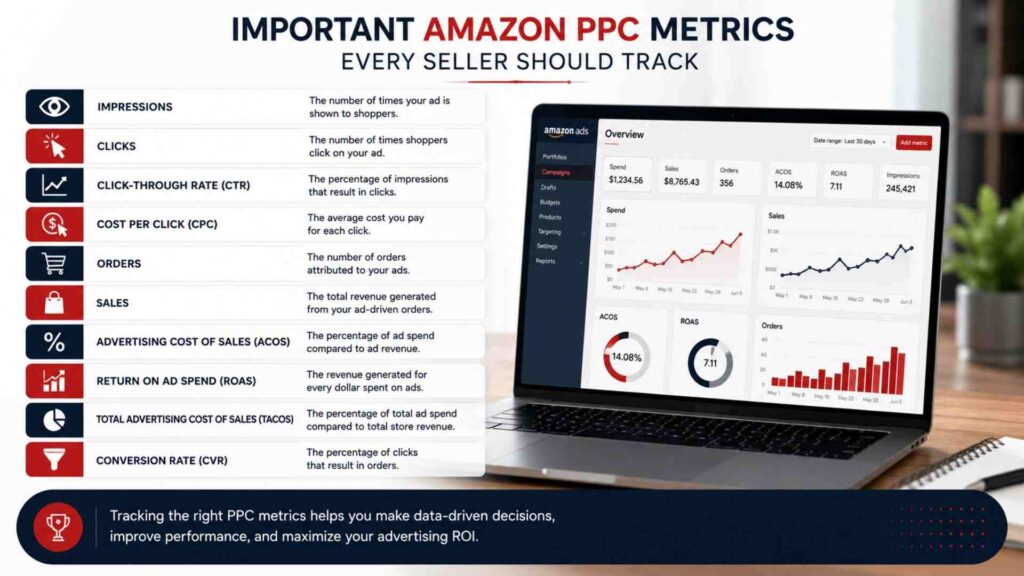
Launching a campaign is only the beginning. To improve performance and maximize your return on investment, you need to monitor the right metrics.
Amazon Seller Central provides detailed advertising reports, but understanding what each metric means is essential for making informed decisions.
Below are the most important Amazon PPC metrics every seller should track.
| Metric | What It Means | Why It Matters |
|---|---|---|
| Impressions | Number of times your ad is shown | Measures ad visibility |
| Clicks | Number of times shoppers click your ad | Indicates interest in your product |
| Click-Through Rate (CTR) | Percentage of impressions that become clicks | Shows how relevant your ad is |
| Cost Per Click (CPC) | Average amount paid for each click | Helps control advertising costs |
| Orders | Number of purchases generated | Measures campaign effectiveness |
| Sales | Revenue generated from PPC ads | Tracks advertising performance |
| Advertising Cost of Sales (ACOS) | Percentage of ad spend compared to sales | Measures profitability |
| Return on Ad Spend (ROAS) | Revenue earned for every advertising dollar | Indicates advertising efficiency |
| Total Advertising Cost of Sales (TACOS) | Ad spend compared to total sales | Shows long-term business growth |
| Conversion Rate (CVR) | Percentage of clicks that become orders | Measures listing performance |
Impressions
Impressions represent the number of times your advertisement appears in Amazon search results or on product pages.
A high number of impressions means your keywords are receiving visibility.
However, impressions alone don’t guarantee success. If shoppers aren’t clicking your ads, you may need to improve your targeting, bidding strategy, or product listing.
Clicks
Clicks show how many shoppers visited your product after seeing your advertisement. This metric tells you whether your ad is attracting attention.
If impressions are high but clicks are low, consider improving:
- Product title
- Main image
- Price
- Ratings and reviews
- Keyword relevance
Click-Through Rate (CTR)
CTR measures how often shoppers click your ad after seeing it.
Formula
CTR = (Clicks ÷ Impressions) × 100
Example
- Impressions: 20,000
- Clicks: 500
CTR = (500 ÷ 20,000) × 100 = 2.5%
A higher CTR usually indicates that your ad is relevant to customer searches.
General CTR Benchmarks
- Below 0.3% — Needs improvement
- 0.3%–0.7% — Average
- 0.7%–1.5% — Good
- Above 1.5% — Excellent (varies by category)
Cost Per Click (CPC)
CPC is the average amount you pay each time someone clicks your ad.
Formula
CPC = Total Ad Spend ÷ Total Clicks
Example:
- Ad Spend: $120
- Clicks: 300
CPC = $0.40
Lower CPCs can improve profitability, but the cheapest click isn’t always the best. Focus on profitable clicks rather than simply reducing costs.
Orders
Orders indicate how many purchases were generated through your PPC campaigns. Tracking orders helps you identify which campaigns and keywords drive real sales rather than just traffic.
Sales
Sales represent the total revenue generated from PPC advertising.
For example:
- 40 orders
- Average selling price: $30
Total PPC Sales = $1,200
This metric helps determine whether your advertising investment is producing meaningful revenue.
Advertising Cost of Sales (ACOS)
ACOS is one of the most important Amazon PPC metrics.
It shows the percentage of advertising spend compared to advertising-generated sales.
Formula
ACOS = (Ad Spend ÷ Ad Sales) × 100
Example
- Ad Spend = $200
- Sales = $1,000
ACOS = 20%
How to Interpret ACOS
- Below 15% — Excellent
- 15%–25% — Good
- 25%–35% — Acceptable (depending on margins)
- Above 35% — May require optimization
Keep in mind that the ideal ACOS depends on your product’s profit margin.
Return on Ad Spend (ROAS)
ROAS measures how much revenue your ads generate for every dollar spent.
Formula
ROAS = Ad Sales ÷ Ad Spend
Example:
- Sales = $2,000
- Ad Spend = $400
ROAS = 5
This means every $1 spent on advertising generated $5 in revenue.
Higher ROAS generally indicates better advertising efficiency.
Total Advertising Cost of Sales (TACOS)
Unlike ACOS, TACOS compares advertising spend against your total sales, including both paid and organic orders.
Formula
TACOS = Ad Spend ÷ Total Sales × 100
As your organic rankings improve, your TACOS should gradually decrease, showing that PPC is contributing to long-term business growth.
Conversion Rate (CVR)
Conversion Rate measures the percentage of visitors who purchase your product after clicking your advertisement.
Formula
Conversion Rate = Orders ÷ Clicks × 100
Example:
- Clicks = 250
- Orders = 25
Conversion Rate = 10%
A low conversion rate often indicates problems with your product listing rather than your advertising campaign.
Improve:
- Images
- Product title
- Bullet points
- A+ Content
- Pricing
- Reviews
30-Day Amazon PPC Launch Plan
Week 1: Setup and Launch
- Optimize your listing (title, images, bullets, backend keywords) before spending a dollar on ads
- Launch one automatic campaign per product with a modest daily budget
- Set conservative bids based on Amazon’s suggested bid range
Week 2: Data Collection
- Let campaigns run without major changes to gather statistically useful data
- Check search term reports every 2–3 days
- Note early winning and losing search terms, but avoid overreacting to small sample sizes
Week 3: Refinement
- Launch manual campaigns targeting proven converting keywords from week 2
- Add negative keywords to automatic campaigns for irrelevant or non-converting terms
- Adjust bids up on strong performers, down on weak ones
- Use the data collected during the first two weeks to begin focused Amazon PPC optimization.
Week 4: Scale and Structure
- Increase budgets on campaigns hitting target ACoS
- Consider adding Sponsored Brands if you have Brand Registry
- Set a recurring weekly review cadence going forward
By day 30, the fog should have lifted — you’ll know which keywords convert, which products deserve more budget, and which campaign types actually earn their spend. From here, PPC stops being trial and error and becomes a process you can repeat and scale.
- New product launches: Budget for a higher ACoS (even 50–100%) in the first 30–60 days, since the goal is rank and review velocity, not immediate profit.
- Established products: Aim for ACoS in line with your break-even point, factoring in Amazon referral fees, FBA fees, and cost of goods.
- Daily budget starting point: A common rule of thumb is enough to generate at least 15–30 clicks per day per campaign, so you gather meaningful data without waiting weeks.
- Reallocate, don’t just increase: Instead of raising total spend, shift budget from underperforming campaigns into proven winners first.
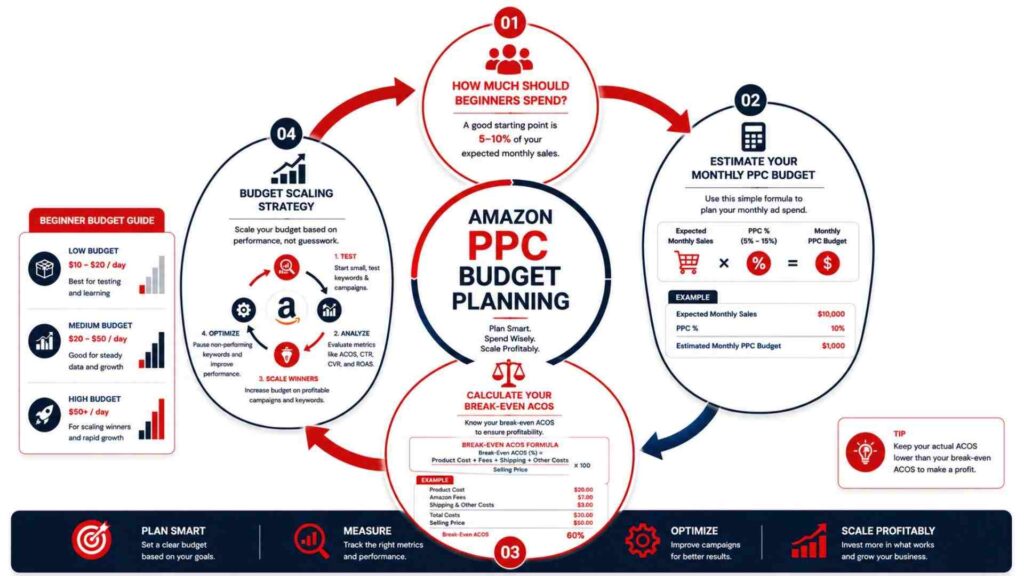
A simple way to sanity-check your budget: calculate your product’s break-even ACoS (profit margin before ad spend, expressed as a percentage). Treat that figure as the line mature campaigns shouldn’t cross — while giving new launches some breathing room to go over it for a limited stretch.
Amazon PPC Budget Planning
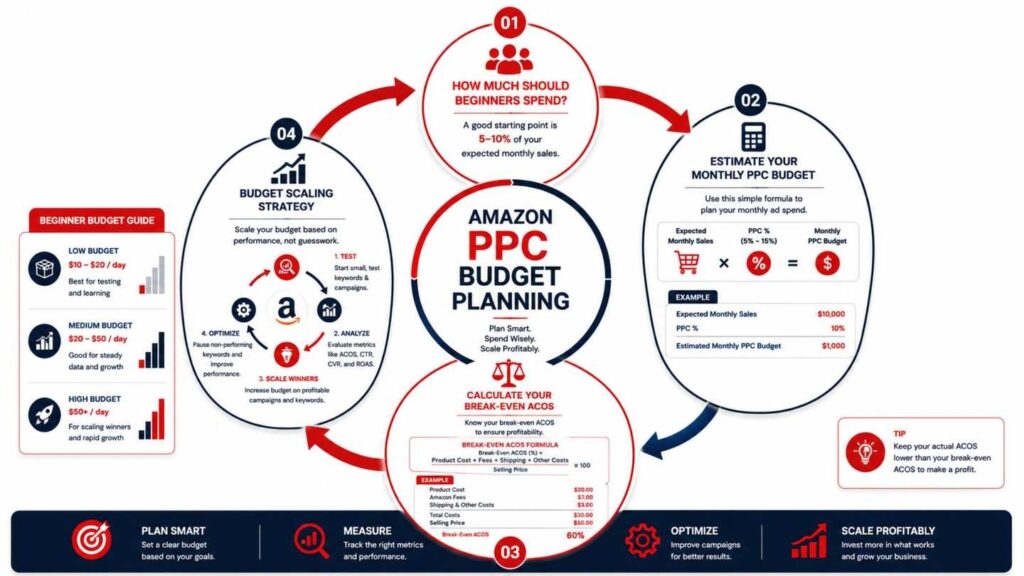
One of the biggest questions new sellers ask is, “How much should I spend on Amazon PPC?” The answer depends on your product price, competition, profit margins, and business goals. However, starting with a realistic budget allows you to collect valuable data without overspending.
Remember, PPC isn’t just an expense—it’s an investment in visibility, traffic, and sales. The goal is to spend wisely, learn from your data, and gradually scale profitable campaigns.
How Much Should Beginners Spend?
If you’re new to Amazon PPC, avoid spending hundreds of dollars on day one. Instead, start with a manageable budget that gives Amazon enough data to optimize your campaigns.
Here are some general recommendations:
| Daily Budget | Best For |
|---|---|
| $10/day | Testing a new product with low competition |
| $20/day | Most beginner sellers |
| $50/day | Products in competitive categories |
| $100+/day | Established brands with multiple products |
The most important thing isn’t the size of your budget—it’s how effectively you optimize your campaigns.
Estimate Your Monthly PPC Budget
You can calculate your estimated monthly advertising spend with a simple formula:
Monthly Budget = Daily Budget × 30
For example:
| Daily Budget | Monthly Budget |
|---|---|
| $10 | $300 |
| $20 | $600 |
| $50 | $1,500 |
| $100 | $3,000 |
Choose a budget that your business can comfortably sustain while allowing enough time to gather meaningful performance data.
Calculate Your Break-Even ACOS
Before scaling your campaigns, it’s essential to know your Break-Even ACOS. This tells you the highest ACOS you can afford before your advertising becomes unprofitable.
Formula
Break-Even ACOS = Profit Margin (%)
Example
- Selling Price: $40
- Total Cost (Product + Amazon Fees + Shipping): $28
- Profit: $12
Profit Margin:
($12 ÷ $40) × 100 = 30%
Your break-even ACOS is 30%.
If your campaign has an ACOS below 30%, it’s generating profit. If it’s above 30%, you’ll need to optimize your campaign or improve your margins.
Budget Scaling Strategy
Once you identify profitable campaigns, increase your budget gradually instead of making large changes overnight.
A safe approach is to increase your daily budget by 10–20% every few days while monitoring performance.
When scaling, prioritize campaigns that:
- Generate consistent sales
- Have a healthy ACOS
- Maintain strong conversion rates
- Deliver a positive ROAS
Scaling too quickly can disrupt campaign performance, so make changes gradually and let Amazon’s algorithm adjust.
Weekly Amazon PPC Optimization Checklist
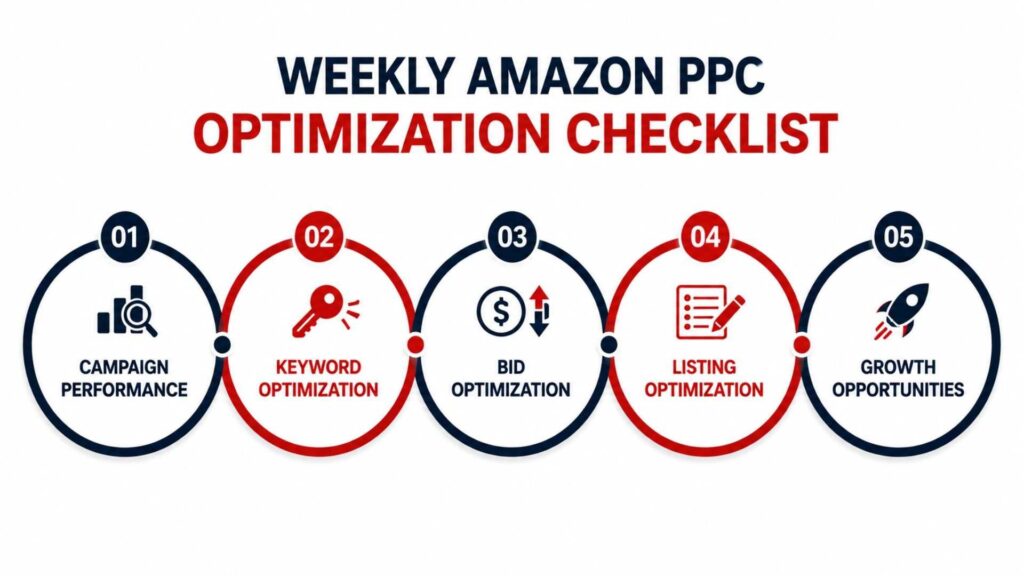
Successful Amazon PPC campaigns require regular attention. Reviewing your campaigns weekly helps you reduce wasted ad spend, improve profitability, and discover new growth opportunities.
Use this checklist as part of your weekly routine:
Campaign Performance
- Review campaign impressions
- Check click-through rate (CTR)
- Monitor conversion rate
- Analyze ACOS and ROAS
- Compare week-over-week performance
Keyword Optimization
- Download the Search Term Report
- Identify high-converting keywords
- Add new Exact Match keywords
- Pause keywords with high spend and no sales
- Add irrelevant searches as negative keywords
Bid Optimization
- Increase bids on profitable keywords
- Lower bids on expensive keywords
- Review suggested bids from Amazon
- Optimize placement adjustments
Listing Optimization
- Improve product images
- Update bullet points if needed
- Optimize the product title
- Review pricing against competitors
- Monitor customer reviews and ratings
Growth Opportunities
- Test new long-tail keywords
- Launch Product Targeting campaigns
- Analyze competitor products
- Expand successful campaigns
- Review seasonal trends
Following this checklist every week can help you maintain healthy campaigns and steadily improve your advertising performance over time.
Common Amazon PPC Mistakes to Avoid
Even experienced sellers make mistakes, but recognizing them early can save you money and improve campaign results.
Here are some of the most common Amazon PPC mistakes—and how to avoid them.
1. Relying Only on Automatic Campaigns
Automatic campaigns are excellent for keyword discovery, but they shouldn’t be your only strategy.
Once you identify profitable search terms, move them into Manual campaigns where you have greater control over bids and targeting.
2. Ignoring Search Term Reports
The Search Term Report shows exactly what shoppers searched before clicking your ad.
Ignoring this report means missing opportunities to:
- Discover profitable keywords
- Eliminate irrelevant traffic
- Improve targeting
Review it at least once a week.
3. Not Using Negative Keywords
Without negative keywords, your ads may appear for irrelevant searches, resulting in unnecessary clicks and wasted advertising spend.
For example, if you sell premium products, adding negative keywords like “cheap” or “free” can help filter out less relevant traffic.
4. Sending Traffic to a Poor Product Listing
PPC can drive visitors to your listing, but it can’t force them to buy.
If your listing has:
- Low-quality images
- Weak product descriptions
- Few reviews
- Uncompetitive pricing
your conversion rate will suffer, regardless of how much you spend on ads.
5. Setting Unrealistic Budgets
A very small budget may prevent your ads from collecting enough data, while an excessively large budget can lead to unnecessary spending before you’ve optimized your campaigns.
Choose a budget that matches your goals and adjust it based on performance.
6. Using the Same Bid for Every Keyword
Not all keywords perform equally.
Increase bids for keywords that consistently generate profitable sales, and reduce bids for expensive keywords that fail to convert.
This targeted approach improves overall campaign efficiency.
7. Pausing Campaigns Too Quickly
Many beginners stop campaigns after only a few days because they don’t see immediate results.
Amazon’s algorithm needs time to gather data and optimize delivery.
Allow campaigns to run long enough to collect meaningful insights before making major decisions.
8. Ignoring Placement Performance
Amazon reports show where your ads appear, such as:
- Top of Search
- Rest of Search
- Product Pages
Analyzing placement performance helps you allocate your budget to the locations delivering the best results.
9. Focusing Only on ACOS
While ACOS is important, it shouldn’t be your only success metric.
Also monitor:
- ROAS
- Conversion Rate
- Total Sales
- TACOS
- Organic ranking improvements
Sometimes a higher ACOS is acceptable if it helps launch a new product or increase long-term organic visibility.
10. Never Testing New Strategies
Amazon’s marketplace changes constantly.
Continue testing:
- New keywords
- Different bids
- Match types
- Product targeting
- Campaign structures
Regular testing helps uncover opportunities that competitors may overlook.
Frequently Asked Questions
1. How does Amazon PPC work for beginners?
Amazon PPC allows beginners to advertise products by bidding on keywords or product targets. When shoppers click the sponsored ad, the seller pays a small fee. Beginners often start with Sponsored Products and Automatic campaigns to collect keyword data before expanding into Manual campaigns.
2. Is Amazon PPC worth it?
Yes. Amazon PPC is one of the most effective ways to increase product visibility, drive qualified traffic, and generate sales. When campaigns are properly managed and optimized, PPC can deliver a strong return on investment while supporting long-term organic growth.
3. How much should I spend on Amazon PPC?
Most beginners start with $10–$20 per day, while more competitive products may require $50 or more per day. Your ideal budget depends on your product category, competition, and profit margins.
4. What is a good ACOS?
There’s no universal benchmark because every product has different profit margins. However, many sellers aim for an ACOS between 15% and 30%. Your target should remain below your break-even ACOS whenever possible.
5. Can I run Amazon PPC without FBA?
Yes. Both Fulfillment by Amazon (FBA) and Fulfillment by Merchant (FBM) sellers can use Amazon PPC, provided their products are eligible for advertising.
6. How long does Amazon PPC take to show results?
You may start receiving impressions and clicks within a few hours of launching a campaign. However, meaningful optimization typically requires 2–4 weeks of data, depending on your budget and traffic.
7. Does Amazon PPC improve organic rankings?
While Amazon hasn’t publicly confirmed every ranking factor, many sellers observe that increased sales generated through PPC can contribute to better organic rankings over time by improving sales velocity and product visibility.
Conclusion
Understanding how does Amazon PPC work is the first step toward building successful advertising campaigns on Amazon. PPC is more than simply placing ads—it’s a data-driven strategy that combines keyword research, smart bidding, continuous optimization, and high-quality product listings to attract the right customers.
Whether you’re launching your first product or scaling an established brand, Amazon PPC can help you increase visibility, drive targeted traffic, and grow sales when managed effectively. Start with a realistic budget, monitor your key metrics, and refine your campaigns regularly based on performance data.
Over time, small improvements in targeting, bidding, and listing optimization can lead to significant gains in profitability and long-term business growth.